Unicode to Shree Guj 768 & 769 – Complete Gujarati Font Conversion Guide (2026)
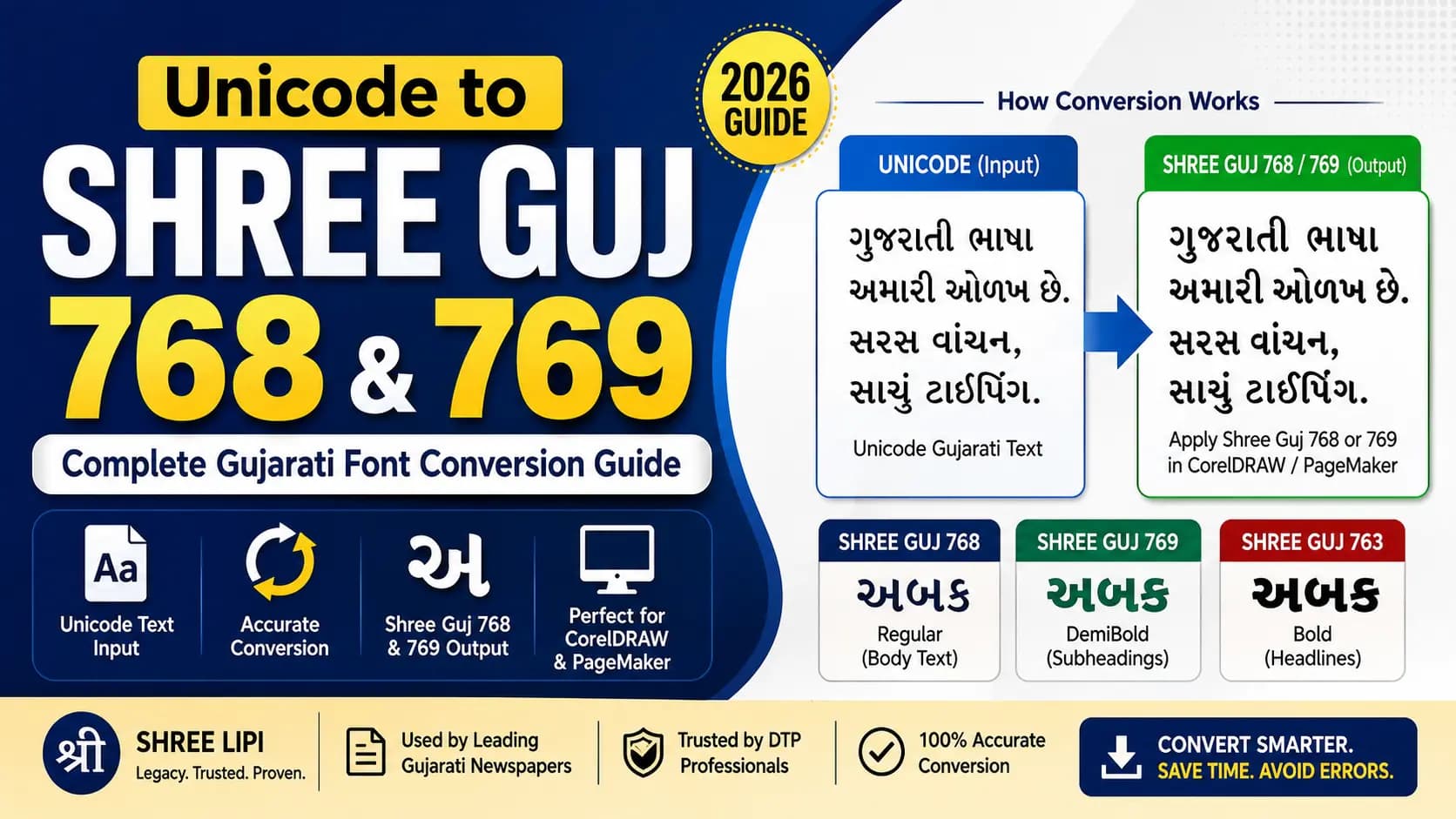
If you work in Gujarati DTP, you have probably dealt with this scenario more than once. You receive a Gujarati article, brochure text, or a book chapter typed in Unicode. Your CorelDRAW or PageMaker layout uses Shree Guj 768 or Shree Guj 769. You paste the text and apply the font — and the screen fills with garbled output that looks nothing like Gujarati.
This is not a font error. It is an encoding mismatch — and it happens every single time someone pastes Unicode text into a legacy Shree Guj font environment without converting first.
This guide explains what Shree Guj 768 and 769 actually are, why the mismatch happens, how conversion works, and what to watch for when you do it.
Table of Contents
- What Are Shree Guj 768 and Shree Guj 769?
- Why Pasting Unicode Into Shree Guj Does Not Work
- Who Uses This Conversion — Real Workflows
- How to Convert Unicode to Shree Guj 768/769
- Shree Guj 768 vs 769 — Which One?
- Pros and Cons of Conversion
- Common Problems and Fixes
- The Better Long-Term Workflow
- Frequently Asked Questions
What Are Shree Guj 768 and Shree Guj 769?
Shree Guj 768 and Shree Guj 769 are part of the same Gujarati font family — the Shree 768 series developed by Modular Infotech Pvt. Ltd. in Pune. Modular Infotech, established in 1983, is the same company behind the Shree Lipi font system used widely across Hindi and Marathi DTP in India. Learn more about the History of Shree Lipi.
The three fonts in this family are:
- Shree Guj 768 — Regular weight. The workhorse of the family. Used for newspaper body text, article body copy, and any content where a clean, readable standard weight is needed. This is the most widely deployed variant in Gujarati DTP workflows.
- Shree Guj 769 — DemiBold weight. A middle weight between Regular and Bold. Used for subheadings, bylines, pull quotes, and any text element that needs to stand out from body copy without being as heavy as a full bold headline.
- Shree Guj 763 — Bold weight. The headline variant — used for display text, front-page headlines, and any typographic element that needs maximum visual weight.
All three fonts share the same base character structure and were designed to work together within a single layout. But critically — each one has its own internal ASCII character mapping. Converting for 768 and then applying font 769 in CorelDRAW will give you wrong output. The conversion must match the exact font variant used in your template.
These fonts were used by major Gujarati newspapers including Gujarat Samachar, Sandesh, and Divya Bhaskar as part of their legacy Shree Lipi printing pipeline. Decades of archived newspaper content, books, and official documents exist in these fonts across Gujarat.
Why Pasting Unicode Into Shree Guj Does Not Work
Both Shree Guj 768 and 769 are non-Unicode legacy fonts. Like all Shree Lipi fonts, they store Gujarati characters at custom ASCII positions in the TTF file — not at the standard Unicode code points in the Gujarati block (U+0A80–U+0AFF). If you want to dive deeper, check out our guide on Unicode vs ASCII Encodings.
When you paste Unicode Gujarati text into CorelDRAW and apply Shree Guj 768, the software reads the Unicode code points and looks them up in the Shree Guj 768 character table. Those Unicode positions map to completely different glyphs in the legacy font's ASCII table — so what renders is a random assortment of wrong characters.
The Unicode to Shree Lipi Converter solves this by translating in the correct direction: it reads each Unicode Gujarati code point, finds its corresponding ASCII position in the Shree Guj 768 (or 769) character map, and outputs that ASCII value. The result looks like random English characters in a text editor — but when you paste it into CorelDRAW and apply Shree Guj 768, every character renders exactly as it should.
Who Uses This Conversion — Real Workflows
Gujarati Newspaper DTP Operators
The most frequent users. Subeditors at regional Gujarati newspapers type or receive content in Unicode but their page templates in PageMaker or CorelDRAW are built around Shree Guj 768 for body text and Shree Guj 769 for subheads. Conversion happens multiple times per publishing cycle.
Book and Magazine Publishers
Publishers who typeset Gujarati books and magazines in Shree Lipi workflows receive manuscripts from authors in Unicode — because that is how modern Gujarati typing works on every phone and computer. The manuscript needs conversion before it enters the layout.
Government Document Designers
State government departments in Gujarat that maintain Shree Lipi-based document templates for official publications receive input from officers typed in Unicode. Conversion bridges the two systems.
DTP Freelancers
Freelancers handling Gujarati print projects for clients across different regions regularly encounter both systems. A client hands over Unicode text; the press template uses Shree Guj. Conversion is the routine first step.
How to Convert Unicode to Shree Guj 768 or 769 — Step by Step
Step 1 — Confirm which variant your template uses
Open your CorelDRAW or PageMaker layout. Check the font name in the font dropdown for the text frames that will receive the Gujarati content. Note exactly whether it says Shree Guj 768 or Shree Guj 769. These are different mappings. Use the wrong one in the converter and the output will have systematic errors throughout.
Step 2 — Prepare your Unicode source text
Copy your Gujarati Unicode text from wherever it is — Google Docs, MS Word, a website, WhatsApp. If you are typing fresh, any standard Gujarati Unicode keyboard on your phone or computer produces compatible input. Proofread at this stage — the converter translates exactly what it receives. Typos carry through.
Step 3 — Paste into the converter and select Shree Guj 768 or 769
Open the Unicode to Shree Lipi Converter. Paste your Unicode text into the input field. Select the correct target font — Shree Guj 768 for regular weight, Shree Guj 769 for demibold. Click Convert. The tool processes the full character mapping including vowel matras, half-forms, conjuncts, and special characters automatically.
Step 4 — Verify the output before using it
The output will look like random English characters and symbols in the output box — this is correct and expected. Before copying the full output for production use, test with a short sample first. Paste two or three lines into CorelDRAW and apply Shree Guj 768 or 769. Verify that matras are in the correct positions, conjuncts are forming correctly, and text reads as expected.
Step 5 — Copy and paste into your DTP layout
Once verified, copy the complete converted output and paste it into your CorelDRAW or PageMaker text frames. Apply the Shree Guj font. Your Gujarati content renders correctly, print-ready.
Shree Guj 768 vs 769 — Which One for Which Purpose?
- Body text, article copy, standard paragraphs → Shree Guj 768 (Regular)
- Subheadings, bylines, emphasized passages → Shree Guj 769 (DemiBold)
- Headlines, display text, front-page stories → Shree Guj 763 (Bold)
In a typical Gujarati newspaper page, all three variants work together — 768 for columns, 769 for section headings, 763 for the front-page banner headline. Each section of the page needs its content converted for the specific variant used in that section's text frames.
If your layout uses only one variant throughout, the conversion is straightforward. If it uses multiple variants on the same page, convert each text block separately with the matching variant selected.
Pros and Cons of Unicode to Shree Guj Conversion
✅ Pros
- Bridges two eras seamlessly. Lets you use modern Unicode typing workflows while maintaining established Shree Lipi print templates. No need to retrain operators or rebuild templates.
- Handles complete Gujarati character set. A good converter covers all standard vowels, consonants, all matra forms, conjuncts, Gujarati numerals (૦–૯), and punctuation in a single pass.
- Fast for any document size. Whether it is a three-word headline or a ten-page document, the conversion is instant.
❌ Cons
- Output is still legacy encoding. The converted text is Shree Guj ASCII — not Unicode. It cannot be read on mobile, searched on the web, or used in any modern digital context without the font installed.
- Variant mismatch causes systematic errors. Selecting 768 when the template uses 769 produces wrong output throughout. You must know exactly which variant your layout uses.
- Formatting is not transferred. The converter handles text content only — font size, colour, and spacing from your source document are not carried over to the output.
Not future-proof. Both variants are legacy systems. New workflows built from scratch should start with Unicode. Our Unicode to Shree Lipi Converter supports the Shree Lipi conversion direction for those maintaining legacy print workflows, while keeping Unicode as the portable master.
Common Problems and Fixes
Problem: Matras are appearing before the consonant instead of after.
Cause: Matra reordering issue — Gujarati matras in Shree Guj encoding sometimes store in a different sequence than the Unicode logical order.
Fix: Verify the source font variant is correctly selected. If the issue persists on specific matras (particularly the aa-kaar and the e-kaar), locate those words and correct them manually in the CorelDRAW output.
Problem: Gujarati conjuncts like ક્ષ or જ્ઞ appear as two separate characters.
Cause: The rendering engine in older CorelDRAW versions may not be combining the conjunct sequence from the converted output correctly.
Fix: Check the CorelDRAW version. In older versions, some complex conjuncts may need to be entered using the font's specific pre-composed glyph key combination rather than the virama sequence.
Problem: Gujarati numerals (૦–૯) appear as English digits after conversion.
Cause: Some Shree Guj encoding positions store numerals at ASCII digit positions, and the conversion maps them to ASCII digits rather than Gujarati numeral Unicode.
Fix: After conversion, if Gujarati numerals are required, manually find and replace 0–9 with ૦–૯ in the CorelDRAW text.
Problem: You cannot tell whether the source text uses Shree Guj 768 or 769.
Cause: The file has changed hands and the original font selection is unclear.
Fix: Open the original file in CorelDRAW or PageMaker and check the font properties panel. If the file cannot be opened, try converting with Shree Guj 768 first — it is the most common variant. If specific characters appear systematically wrong, try Shree Guj 769.
The Better Long-Term Workflow
If you find yourself doing this conversion repeatedly, consider restructuring your workflow for the long term.
Write and store all new Gujarati content in Unicode. Type on your phone, in Google Docs, in any Unicode editor. Unicode text is portable, searchable on Google, readable on every device, and future-proof.
Convert to Shree Guj only at the print output stage. Use the converter specifically when your print template requires Shree Guj 768 or 769 — not before. Keep the Unicode master and convert a fresh copy for each print job.
For Devanagari parallel workflows — if you also handle Hindi or Marathi Shree Lipi conversions alongside your Gujarati work — our Unicode to Shree Lipi Converter handles Hindi and Marathi Shree Dev fonts in the same approach. Unicode in, Shree Lipi out, print-ready.
This two-layer approach — Unicode master plus legacy print output — is how modern Gujarati publishing shops that work across digital and print are managing the transition today.
Key Takeaways
- Shree Guj 768 is Regular weight; 769 is DemiBold. They use different internal encodings and are not interchangeable in conversion.
- Conversion solves the "gibberish text" issue caused by pasting Unicode into legacy templates.
- Always verify output in your DTP software before running large conversions.
- Modern workflows should maintain Unicode text as the master and convert to Shree Guj only for legacy print templates.
Conclusion
Shree Guj 768 and 769 are not obscure fonts from a forgotten era. They are the backbone of Gujarati DTP workflows that are still actively running in newspaper composing rooms, printing presses, and publishing houses across Gujarat today.
If your work sits at the intersection of modern Unicode content and legacy Shree Guj print workflows, you need a converter that handles this transition accurately — matching the right variant, handling all matras and conjuncts, and producing clean output without a character limit or a subscription fee.
For your Devanagari parallel needs — Hindi and Marathi Shree Dev font conversions in the same workflow — our Unicode to Shree Lipi Converter handles that direction with the same accuracy and at no cost.
Explore our related guides on the History of the Shree Lipi Font System, Unicode vs ASCII — How Hindi Fonts Actually Work, and the Shree Guj 763 Conversion Guide for the complete picture of Shree Lipi Gujarati typography.
Read Next:
Frequently Asked Questions
Ready to convert? Our main tool handles Unicode ↔ Shree Lipi with the same accuracy and speed — instantly in your browser.
Try Unicode ↔ Shree Lipi Converter