Unicode vs ASCII – How Hindi Fonts Actually Work (And Why It Matters for You)
You type a Hindi sentence in Kruti Dev. It looks perfect on your screen. You copy it and paste it into WhatsApp. What arrives on the other person's phone looks like this: fgUnh Vkbfiax cgqr vPNh gSA
Gibberish. Completely unreadable. And you have no idea why.
Or you receive a Hindi document from a government office, open it on your laptop, and see a column of empty boxes where the text should be. Or you try to Google something from a Hindi newspaper article you read, and nothing comes up.
These are all symptoms of the same underlying issue — and it is not a bug, a corrupted file, or a software glitch. It is encoding. Specifically, the difference between Unicode and ASCII-based font encoding. Once you understand what is actually happening under the hood, every one of these frustrations makes complete sense — and you will know exactly what to do about them.
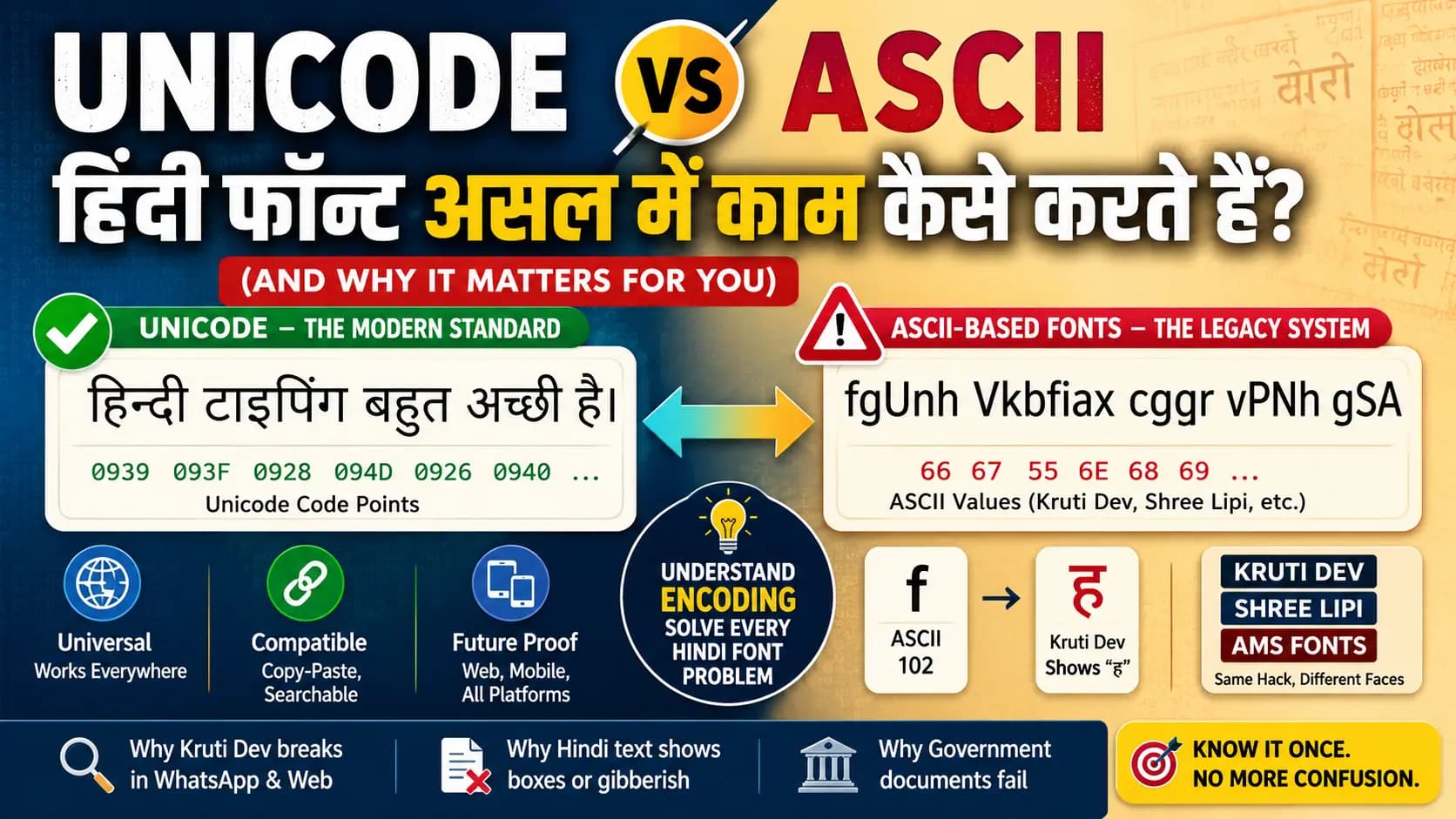
Table of Contents
- What Is ASCII — And Why Did India's Early Hindi Fonts Use It?
- The ASCII Font Hack — How Kruti Dev and Shree Lipi Were Born
- What Is Unicode — And How Is It Different?
- The Real-World Consequences — Why This Matters Every Day
- So Why Are Legacy Fonts Still Used?
- The Bridge — How Conversion Works
- ISCII — The Step Between ASCII and Unicode
- Conclusion
- Frequently Asked Questions
What Is ASCII — And Why Did India's Early Hindi Fonts Use It?
ASCII stands for American Standard Code for Information Interchange. It was developed in the 1960s in the United States as a way to represent text in computers using numbers. Every character in the English alphabet — uppercase, lowercase, digits, punctuation — was assigned a number between 0 and 127. That is 128 total characters, stored in 7 bits of data.
ASCII was designed entirely for English. The letter "A" is stored as the number 65. The letter "k" is stored as 107. When your computer displays text, it reads these numbers and draws the corresponding letter shapes using a font file.
Now Hindi has 14 vowels, 33 consonants, numerous matras, half-forms, conjuncts, and special characters. The Devanagari script is an abugida, a writing system where consonants carry an inherent vowel sound, and additional vowels are indicated through diacritic marks (matras) attached to the consonant. It is fundamentally more complex than the English alphabet. And none of it fit anywhere in ASCII's 128-character table.
When computers arrived in India in the 1980s and desktop publishing began in the early 1990s, Indian software developers faced a hard problem: how do you display Hindi on hardware and software designed entirely for English?
The solution they found was clever but it created problems that the industry is still solving today.
The ASCII Font Hack — How Kruti Dev and Shree Lipi Were Born
The workaround was this: take the existing ASCII character table — all 128 positions — and replace the letter shapes in the font file with Devanagari character shapes instead.
So in a font like Kruti Dev 010, the position that normally displays the English letter "d" was reprogrammed to display the Hindi consonant "क". The position for "f" was reprogrammed to display the matra "ि" (the short I matra). The position for "j" was reprogrammed to display "र".
The computer itself never knew it was dealing with Hindi. It stored the number 100 — which is ASCII for "d" — and Kruti Dev's font file drew "क" when it encountered that number. From the computer's perspective, everything was still English. Only the visual output looked like Hindi — because the font drew Hindi shapes instead of English ones.
This is what makes Kruti Dev, Shree Lipi, DevLys, AMS fonts, and all other Indian legacy fonts "non-Unicode." They are not a true representation of Hindi text. They are a visual illusion — ASCII characters wearing a Devanagari costume.
Proof: In Kruti Dev encoding, the word हिन्दी "Hindi" is actually stored as: fgUnh — those are ASCII characters: f, g, U, n, h, i. Paste it into any application without Kruti Dev installed and you get exactly those letters. Not gibberish by accident — gibberish by design.
Shree Lipi, DevLys, AMS calligraphy fonts — all of them work on exactly this same principle. Different key mappings, different font aesthetics, but the same underlying architecture: ASCII positions mapped to Devanagari glyph shapes.
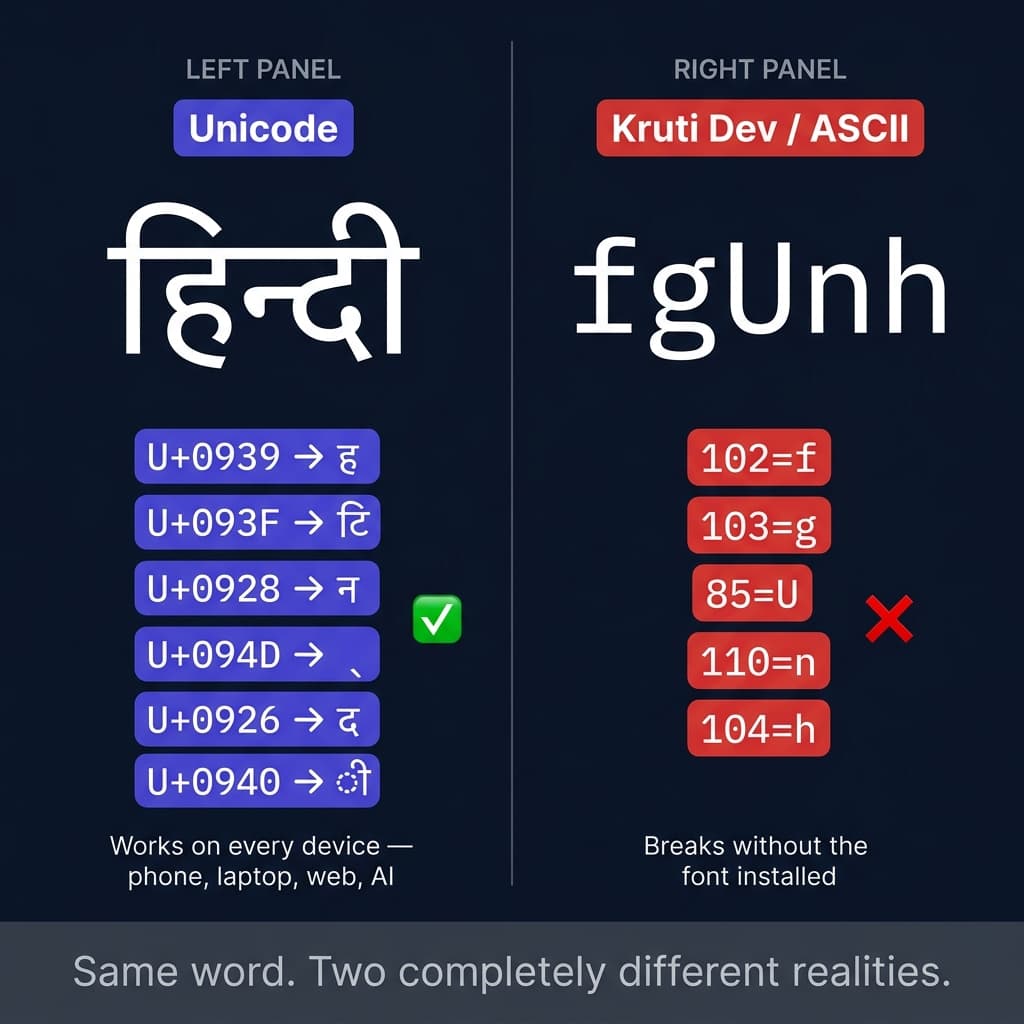
Same word. Two completely different realities under the hood — and only one of them works on every device.
What Is Unicode — And How Is It Different?
Unicode is the answer to the fundamental question: what if every character in every writing system in the world had one single, universally agreed-upon identity number?
The Unicode Consortium — an international standards body whose members include Google, Microsoft, Apple, IBM, Facebook, and the Government of India — maintains the Unicode Standard, a character encoding system that assigns a unique code point to every character in every writing system on Earth. The current version, Unicode 16.0, released in 2024, defines 154,998 characters across 168 scripts.
For Devanagari, Unicode allocates a dedicated block: U+0900 through U+097F. That is 128 code points covering every character needed for Hindi, Marathi, Sanskrit, and Nepali — every vowel, consonant, matra, candrabindu, anusvara, virama (halant), nukta, danda, double danda, and Devanagari numeral.
| Unicode Block | Range | Coverage |
|---|---|---|
| Devanagari | U+0900–U+097F | Hindi, Marathi, Sanskrit, Nepali — all vowels, consonants, matras, halant, danda |
| Devanagari Extended | U+A8E0–U+A8FF | Vedic extensions and additional characters |
| Devanagari Extended-A | U+11B00–U+11B5F | Additional Devanagari for specialized use |
| Vedic Extensions | U+1CD0–U+1CFF | Vedic Sanskrit tonal marks and accents |
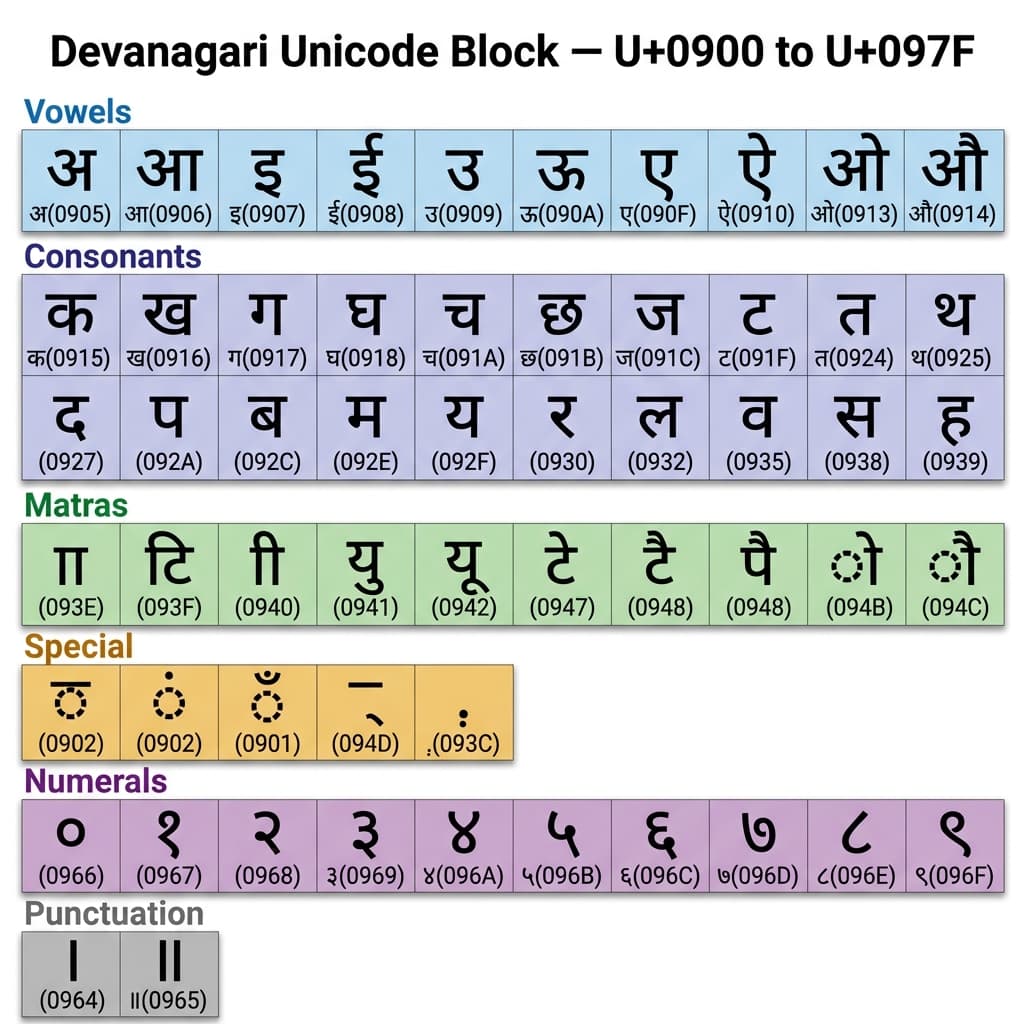
Every Devanagari character in Hindi and Marathi has a permanent, universally recognized address in the Unicode block.
The key difference from ASCII font encoding: in Unicode, the code point IS the character. The character "क" is always U+0915 — on your phone, on your laptop, on a server in the United States, in a Google search index, in a WhatsApp message. Every device, every operating system, every application that supports Unicode (which is all modern software) knows that U+0915 means "क". The font only determines what that character looks like — whether it is rendered in Mangal, Noto Sans Devanagari, Kokila, or Nirmala UI. The underlying identity of the character is independent of the font.
This is the fundamental shift. In the ASCII font world, the character's identity was inseparable from the font. Remove the font, lose the meaning. In the Unicode world, the character's identity is permanent and universal. The font is just the visual skin.
The Real-World Consequences — Why This Matters Every Day
This is not an academic distinction. The difference between Unicode and ASCII font encoding has practical consequences that affect every person who works with Hindi text.
Consequence 1 — Cross-device compatibility
Unicode Hindi text typed on a Windows computer displays correctly on an iPhone, an Android phone, a Mac, a Linux server, and a smart TV — because all modern devices support Unicode. You do not need to install any fonts. The text just works.
Kruti Dev text typed on a Windows computer displays as random English characters on every other device. Because no other device has Kruti Dev installed. The gibberish you see in WhatsApp is exactly what you would expect.
Consequence 2 — Web and search
Google's search index, every website, every email server — all of them operate on Unicode. When you search for a Hindi word on Google, the search engine looks for Unicode code points, not ASCII values. A Kruti Dev document indexed by Google is indexed as random English letters — the actual Hindi content is invisible to the search engine.
This is why millions of Hindi newspaper archives, government documents, and books that exist only in Kruti Dev or Shree Lipi encoding are effectively invisible to Google and every other search engine. They are digitized but unsearchable. Their Hindi content does not exist, from the internet's perspective.
Consequence 3 — NLP and AI processing
Every modern NLP library — spaCy, NLTK, HuggingFace Transformers, Google Cloud Natural Language API — operates on Unicode. Hindi text in Unicode can be processed, translated, analysed for sentiment, summarized by AI, and used to train language models. Kruti Dev text fed to these tools appears as random ASCII — the tools see English characters, not Hindi. Legacy font text is completely opaque to AI and machine learning systems.
Consequence 4 — Copy-paste and sharing
Unicode text can be copied from anywhere and pasted anywhere — a website, a Word document, an email, a WhatsApp message — and it remains correctly encoded Hindi. Kruti Dev text can only be shared between computers with identical font installations.
Consequence 5 — Sorting and hyphenation
It is impossible to sort Kruti Dev text alphabetically according to Devanagari order, because the underlying ASCII values have no relationship to Devanagari sequence. Unicode text sorts correctly using standardized Unicode collation rules. Similarly, hyphenation libraries — which are written for Unicode — cannot function with legacy font text.
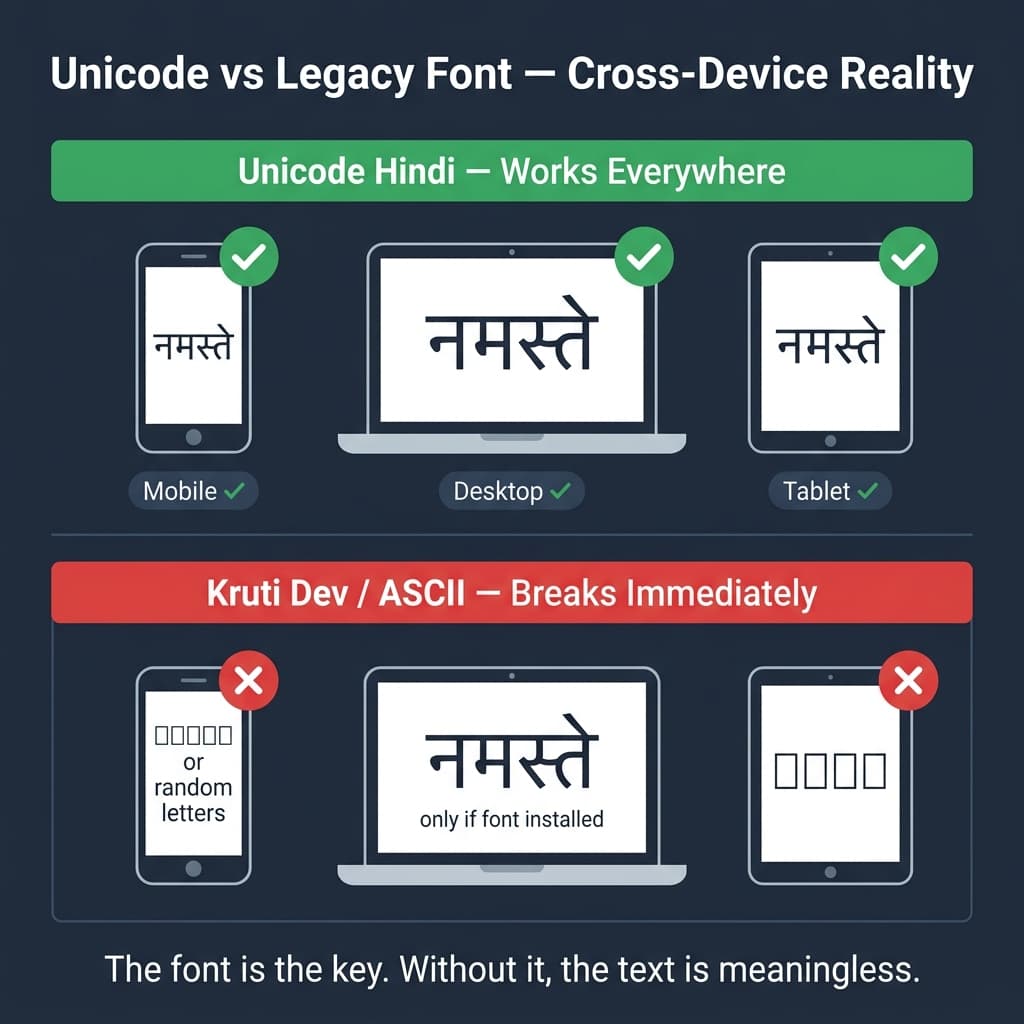
Unicode travels. Legacy fonts stay put — and break the moment they land somewhere the font is not installed.
So Why Are Legacy Fonts Still Used?
If Unicode is so clearly superior, why do Kruti Dev, Shree Lipi, and AMS fonts still exist across millions of workflows in India? Three reasons — and they are all practical.
First: the archive. Decades of Hindi newspaper content, government records, court documents, published books, and institutional files exist only in Kruti Dev or Shree Lipi encoding. Converting millions of documents is a massive, ongoing effort. Until conversion is complete, professionals need to work with this legacy content in its original format.
Second: the printing industry. Hundreds of commercial printing presses across India built their entire DTP infrastructure on legacy fonts — CorelDRAW templates, PageMaker layouts, keyboard layouts, trained operators. The investment in this infrastructure spans decades. For a regional press printing Hindi wedding cards and local newspapers, switching to a Unicode workflow involves rebuilding every template and retraining every DTP operator. See our CorelDRAW Hindi Typing Guide for how professionals bridge both worlds.
Third: artistic quality. This is the one area where legacy fonts genuinely still win. The Shree Lipi Bahar decorative series with 4,400 variations, the AMS calligraphy fonts with up to 12 character variations per letter — this level of artistic variety in Devanagari typography does not yet exist in the Unicode font ecosystem. Wedding card designers, religious publication printers, and festival banner designers continue to use AMS and Shree Lipi not because they do not understand Unicode, but because the artistic output is simply better for their specific use cases.
Professional reality: Unicode for digital. Legacy for print design. Not because legacy is better — but because the legacy font world built a level of Devanagari typographic art that Unicode has not yet fully replicated. Read about the AMS Keyboard Layout to understand how professionals work within this system.
The Bridge — How Conversion Works
For professionals who live in both worlds — writing content in Unicode and publishing it through Shree Lipi-based print workflows — conversion is the daily bridge.
When you convert Unicode Hindi text to Shree Lipi encoding, what actually happens is this: the converter reads each Unicode code point in your text, finds the corresponding ASCII position in the target Shree Lipi font's character table, and replaces it. The output is ASCII text that — when rendered through the correct Shree Lipi font — displays as correct Devanagari.
The reverse conversion — Shree Lipi to Unicode — works in the opposite direction: read each ASCII character, look up which Devanagari code point it corresponds to in that font's mapping table, replace it with the Unicode code point. The result is genuine, portable Unicode text.
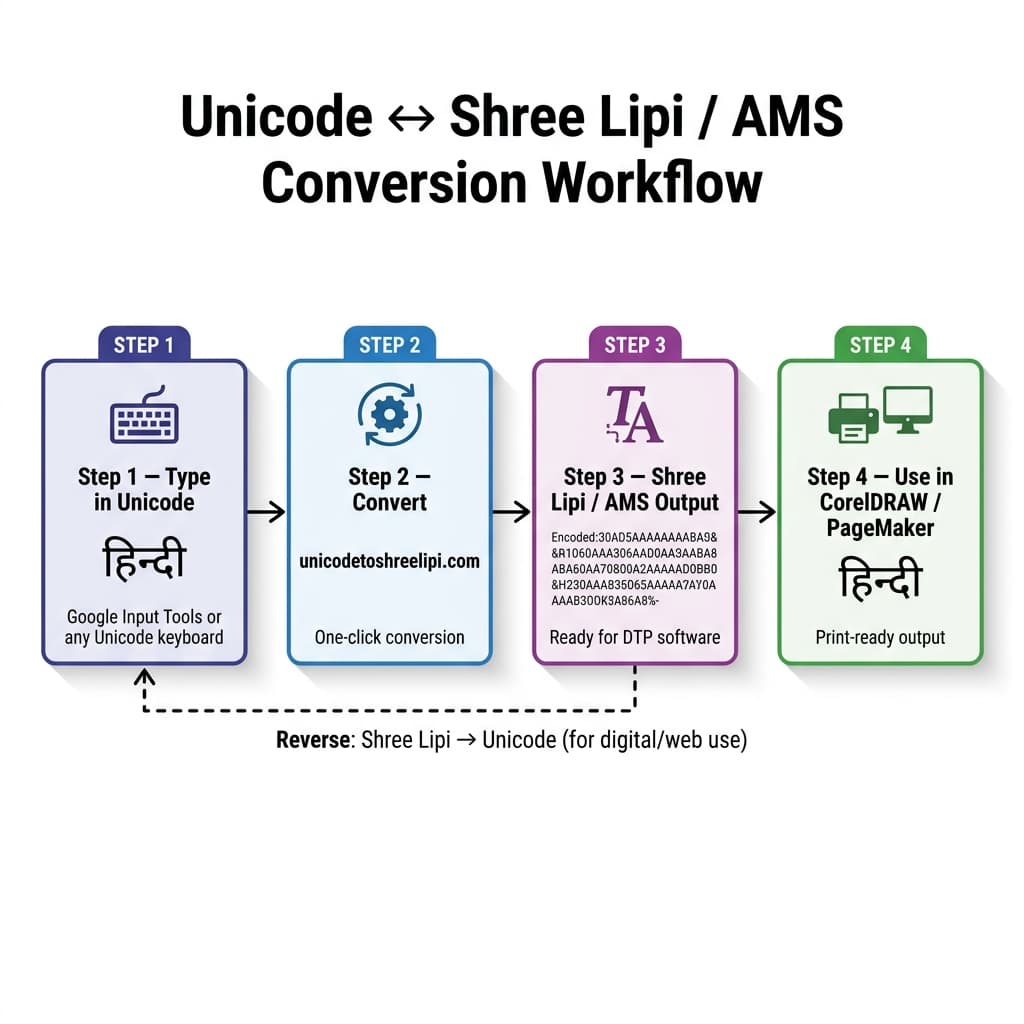
For professionals who work in both worlds — our converter bridges Unicode and Shree Lipi without losing a single character.
Our Unicode to Shree Lipi Converter at unicodetoshreelipi.com handles this conversion for the most commonly used Shree Lipi Devanagari fonts including Shree Dev 0714. Paste your Unicode Hindi or Marathi text, convert in one click, and get Shree Lipi-encoded output ready for use in CorelDRAW or PageMaker.
For AMS calligraphy font workflows — wedding cards, artistic design, decorative Devanagari — the Unicode to AMS Converter at unicodetoshreelipi.com/ams-converter provides the same bridging function in the AMS encoding direction.
Key Takeaways — Conversion
- Unicode → Shree Lipi: for CorelDRAW, PageMaker, and legacy DTP print workflows (see our guide on Adobe InDesign Hindi Typing for modern DTP setup)
- Unicode → AMS: for wedding cards, calligraphy, and artistic Devanagari design
- Shree Lipi → Unicode: for making legacy content searchable and shareable digitally
- Complex Sanskrit or Vedic content with unusual ligatures: manual verification recommended
ISCII — The Step Between ASCII and Unicode
One technical stop worth knowing: before Unicode fully replaced ASCII font encoding, India developed its own intermediate standard called ISCII — Indian Standard Code for Information Interchange.
ISCII was developed by a standardization committee under the Department of Electronics between 1986 and 1988 and adopted by the Bureau of Indian Standards in 1991. It is an 8-bit encoding — using the lower 128 positions as standard ASCII and the upper 128 positions for Indian script characters. ISCII was designed for Devanagari but used escape sequences to switch between different Indic scripts.
The Unicode Consortium deliberately preserved the ISCII layout when creating the Devanagari Unicode block — which is why the Devanagari block at U+0900–U+097F has a structure that closely mirrors the ISCII encoding. This made migration from ISCII to Unicode relatively smooth for software that had already moved to ISCII from pure ASCII font encoding.
ISCII has now been almost completely superseded by Unicode for practical purposes — but understanding it explains why the Unicode Devanagari block is structured the way it is.
Conclusion
ASCII font encoding — the system used by Kruti Dev, Shree Lipi, DevLys, and AMS fonts — stores Hindi text as English character codes and relies entirely on a specific font file to make it look like Devanagari. Remove the font, get gibberish. Unicode stores every Hindi character as a universally recognized code point that works on every device, in every application, without any font installed. The font only determines appearance — the character's identity is permanent and portable.
Both systems exist in active professional use today. Unicode dominates digital publishing, government systems, search, mobile, and AI. Legacy ASCII fonts dominate professional print DTP because of their unmatched artistic font libraries — particularly AMS calligraphy and Shree Lipi Bahar. For anyone who needs to move between these two worlds, our free Unicode to Shree Lipi Converter at unicodetoshreelipi.com and Unicode to AMS Converter at unicodetoshreelipi.com/ams-converter make the transition instant and accurate.
Understanding encoding is not just for developers. It is for every DTP operator, government typist, designer, journalist, and publisher who works with Hindi text. Because the difference between Unicode and ASCII is the difference between text that works everywhere and text that works nowhere without a specific font.
Frequently Asked Questions
Ready to convert? Our main tool handles Unicode ↔ Shree Lipi with the same accuracy and speed — instantly in your browser.
Try Unicode ↔ Shree Lipi Converter