Shree Guj 763 to Unicode – Complete Conversion Guide (How It Works & Who Needs It)
You have a Gujarati document typed in Shree Guj 763. Maybe it is an old newspaper archive. Maybe it is a client's business brochure from ten years ago. Maybe it is a book manuscript that a publisher handed you for reformatting. You open it on a modern system, copy the text, paste it anywhere — and it turns into a stream of random English characters.
Nothing is broken. Nothing is corrupted. What you are seeing is the natural behavior of a legacy font system meeting a world it was never designed for.
This guide explains what Shree Guj 763 actually is, why its text becomes unreadable outside its original environment, how to convert it to Unicode so it works everywhere, who needs this conversion daily, what the common problems are, and why the smarter long-term workflow puts Unicode first.
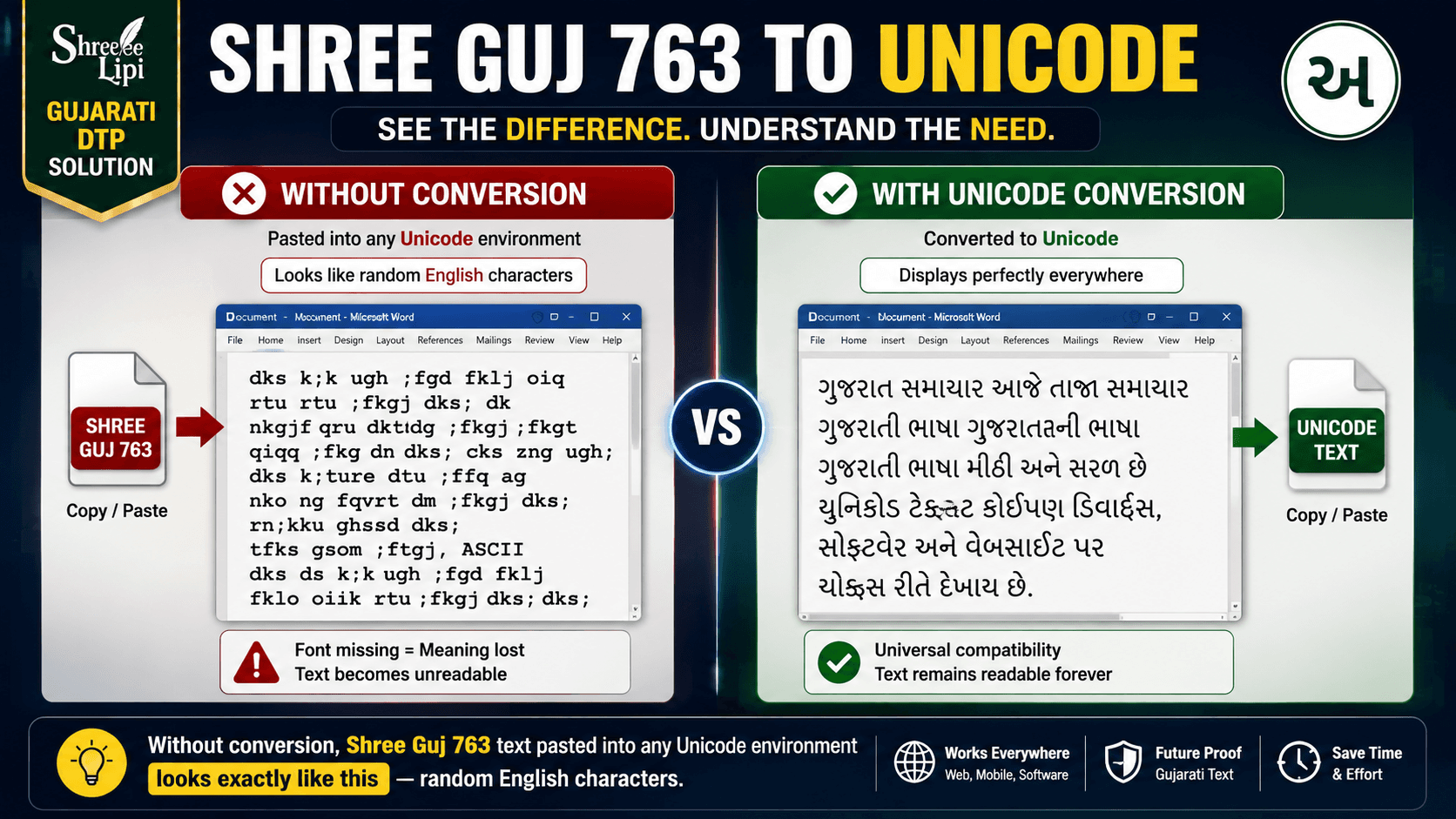
Without conversion, Shree Guj 763 text pasted into any Unicode environment looks exactly like this — random English characters.
Table of Contents
- What Is Shree Guj 763?
- Why Shree Guj 763 Was Dominant in Gujarati DTP
- The Technical Problem — Why Conversion Is Needed
- Who Uses This Conversion — Real Workflows
- How to Convert Shree Guj 763 to Unicode — Step by Step
- What Happens Under the Hood — The Conversion Mechanism
- Pros and Cons of Shree Guj 763 to Unicode Conversion
- Common Problems and How to Fix Them
- The Better Workflow — Why Unicode Should Be Your Starting Point
- Conclusion
- Frequently Asked Questions
What Is Shree Guj 763?
Shree Guj 763 is a non-Unicode legacy Gujarati font developed by Modular Infotech Pvt. Ltd., the Pune-based Indian language computing company established in 1983. The font was first created in 1992 as part of Modular Infotech's Shree Lipi font system — the same company and system behind Shree Dev 0714 for Hindi and Marathi DTP.
Within the Shree 768 Gujarati font family, the numbering tells you exactly what weight you are dealing with:
- Shree Guj 768 — Regular weight
- Shree Guj 769 — DemiBold weight
- Shree Guj 763 — Bold weight
So Shree Guj 763 is specifically the bold variant of the core Shree 768 Gujarati family. This matters practically: it means 763 text appears thick, heavy, and designed for headings, display typography, newspaper headlines, and anywhere that regular weight text would be too light for the visual context.
Like all Shree Lipi fonts, Shree Guj 763 is a non-Unicode ASCII-based encoding. It maps Gujarati characters to positions in the standard ASCII character table. This is how every Indian language legacy font was built in the pre-Unicode era — Kruti Dev does it for Hindi, Shree Dev does it for Marathi, Shree Guj does it for Gujarati. The font file contains Gujarati glyph shapes assigned to ASCII positions, so what the computer actually stores is a string of English character codes that only look like Gujarati when the correct font is applied.
Remove the font, and you get the raw ASCII: random English letters, numbers, and punctuation that have no meaning without the font to decode them.
Why Shree Guj 763 Was Dominant in Gujarati DTP
In the 1990s and 2000s, Shree Guj 763 and the wider Shree Lipi Gujarati font family became the standard for professional Gujarati printing and publishing across Gujarat.
The reasons were practical. Modular Infotech built its font system specifically for the Indian printing industry — working with professional calligraphers and type designers to create fonts that could handle Gujarati's complex vowel matras, consonant conjuncts, and the specific aesthetic expectations of Gujarati newspaper and book typography.
Three of India's most important Gujarati newspapers — Gujarat Samachar, Sandesh, and Divya Bhaskar — built their entire print production pipelines around Shree Lipi Gujarati fonts. These newspapers collectively reach millions of readers daily. Their DTP operators, compositors, and designers trained on Shree Lipi. Their page templates were built in PageMaker and CorelDRAW with Shree Guj fonts pre-specified. Their entire institutional knowledge of Gujarati DTP was encoded in Shree Lipi workflows.
This is why Shree Guj 763 is not simply a font that some people once used. It is a font system that powered an industry — and it continues to power significant parts of that industry today, even as Unicode has become the standard everywhere else.
Read more about the broader history in our History of the Shree Lipi Font System guide.
The Technical Problem — Why Conversion Is Needed
Unicode is the global standard for text encoding. Gujarati Unicode occupies the block from U+0A80 to U+0AFF — a dedicated range of 128 code points that includes every Gujarati vowel, consonant, matra, virama, and numeral. These code points are permanently assigned and universally recognized by every modern operating system, browser, device, and application.
Shree Guj 763 uses none of these code points. It stores Gujarati characters as ASCII values — the English character table that runs from 0 to 127 (standard) and 128 to 255 (extended). The position that stores "A" in ASCII might store "ક" in Shree Guj 763. The position that stores "b" might store a specific vowel matra. There is no relationship between the ASCII value and any universal Gujarati character identity.
This creates a complete incompatibility between Shree Guj 763 text and any Unicode-aware environment. The Gujarati Unicode block has 85 base characters plus 18 vowel matras (diacritics) plus conjuncts. A converter that maps Shree Guj 763 to Unicode must handle all of these — reading each ASCII byte in the source, looking up its Shree Guj 763 character table entry, identifying which Gujarati character that corresponds to, and outputting the correct Unicode code point.
The additional complexity in Gujarati Unicode conversion is matra reordering. In Shree Guj 763 encoding, matras are stored in a byte sequence that reflects their visual position on screen — which may differ from their logical Unicode order. A good converter must reorder matras from Shree Guj visual sequence to Unicode logical sequence, otherwise the output Unicode text will have characters in the wrong order even if each individual character is correctly identified.
This is technical work that requires a font-specific character mapping table — not something you can approximate or do manually. Learn more about how ASCII-based encoding works in our Unicode vs ASCII guide.
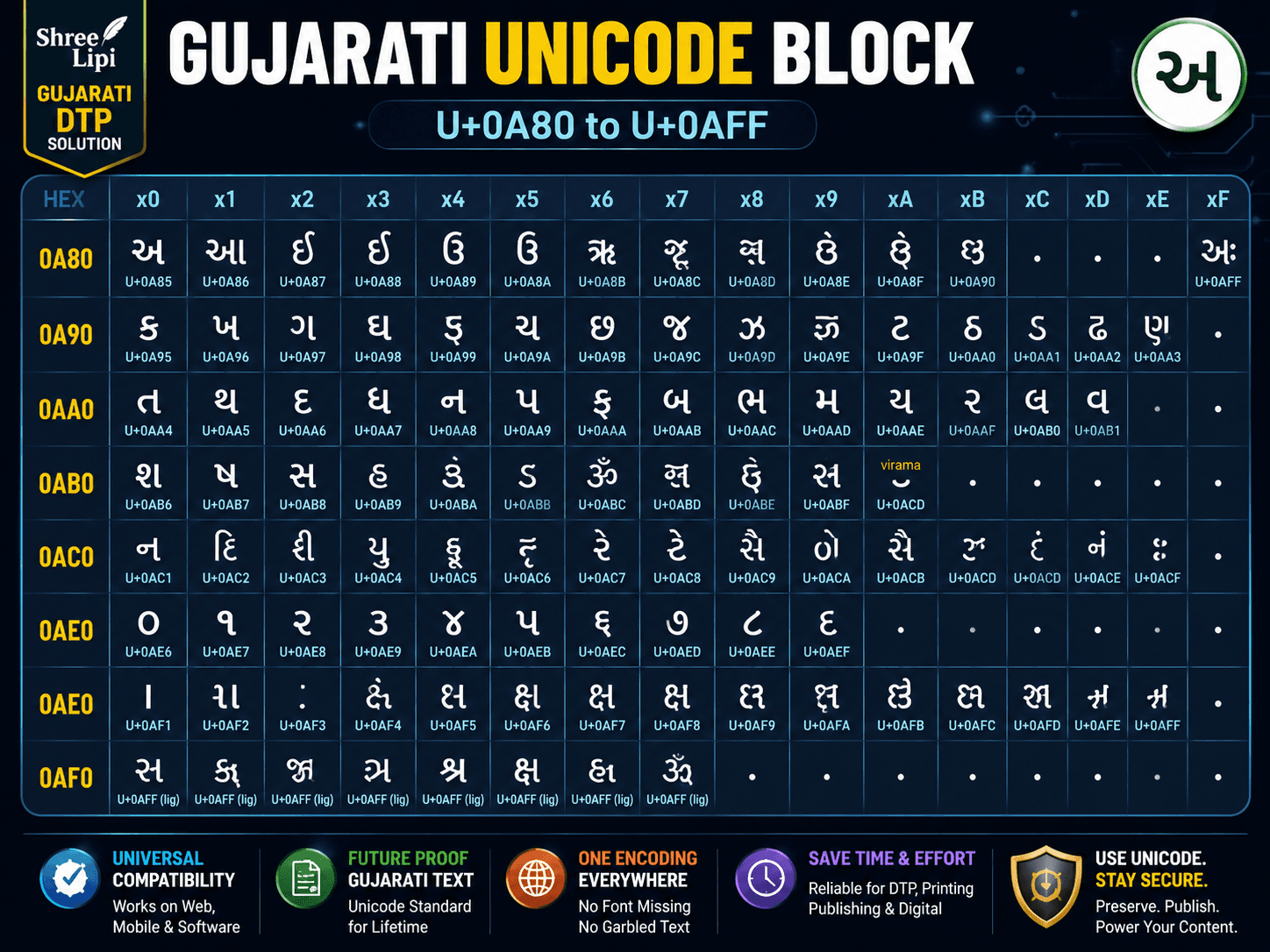
Every Gujarati character has a permanent, universally recognized address in the Unicode standard — Shree Guj 763 has none of these.
Who Uses This Conversion — Real Workflows
The Gujarati Newspaper Archive Team
Gujarat Samachar, Sandesh, Divya Bhaskar, and dozens of regional Gujarati papers have decades of digital archives stored in Shree Lipi Gujarati encoding. As these organizations build searchable digital archives and online content libraries, every article in legacy encoding needs to be converted to Unicode to become searchable by Google, readable on mobile, and indexable in their content management systems.
The Book Digitization Professional
Hundreds of Gujarati books published between 1995 and 2015 were typeset in Shree Lipi Gujarati fonts. As publishers digitize their catalogs for e-books and online distribution, each legacy font text file needs Unicode conversion before it can be properly displayed in ePub readers, PDF with searchable text, or web pages.
The DTP Operator Bridging Two Workflows
A DTP freelancer who works with clients across different eras of Gujarati publishing regularly encounters Shree Guj 763 content. The client has an old brochure in Shree Guj 763 that needs to be reformatted for digital distribution. Converting to Unicode is step one before any digital output is possible.
The Government Records Administrator
State government departments in Gujarat have years of official documents, circulars, and gazette notifications stored in Shree Lipi Gujarati encoding. As government offices migrate to Unicode-based systems, these documents need conversion to remain accessible in modern document management environments.
The Designer Modernizing Legacy Brand Materials
A graphic designer hired to refresh a brand's materials finds the existing Gujarati text in the brand's old CorelDRAW files is Shree Guj 763 encoded. Converting to Unicode lets them bring the text into modern design software without retyping everything from scratch.
How to Convert Shree Guj 763 to Unicode — Step by Step
The conversion process requires a tool that has the Shree Guj 763 character mapping table built in. Here is the complete workflow:
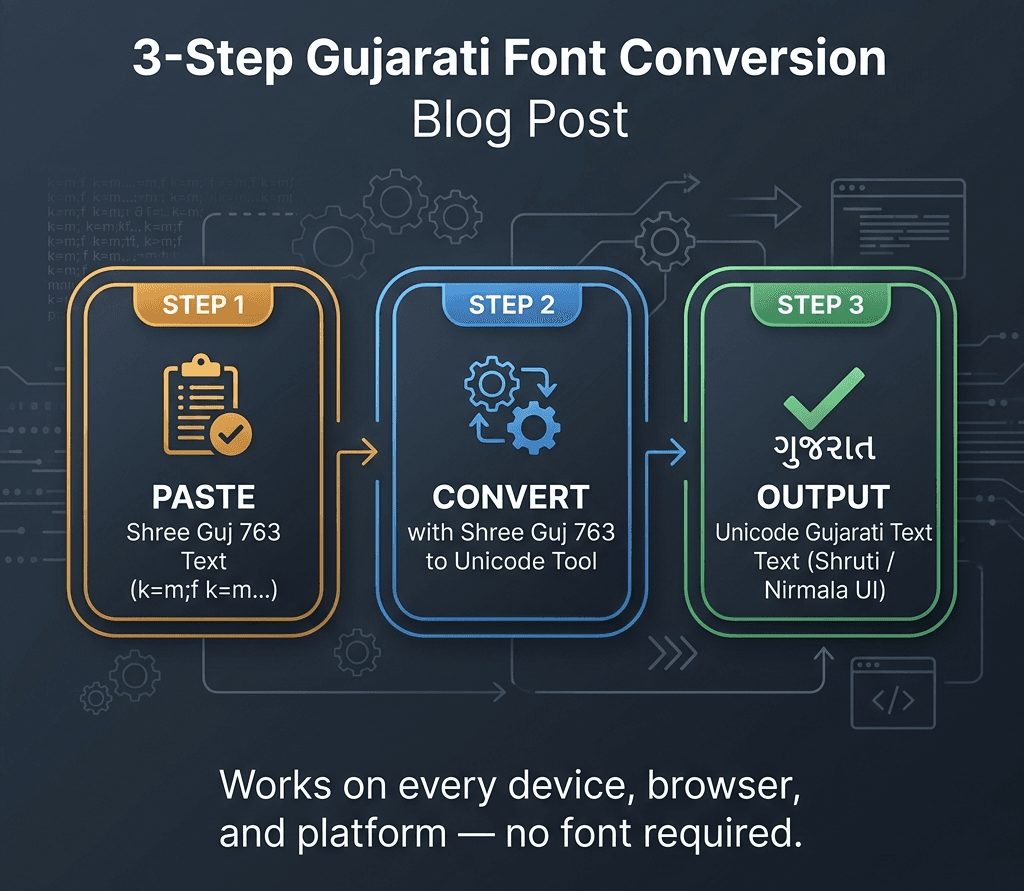
Three steps from legacy to universal — and your Gujarati text works everywhere.
Step 1 — Verify the source font
Before converting, confirm that the text is actually Shree Guj 763 and not another Shree Guj variant. Open the original file in the software it was created in — CorelDRAW, PageMaker, or MS Word. Check the font name in the font dropdown. It should say "Shree-Guj-763" or "Shree Guj 763." If it says Shree Guj 768, 769, or any other number, the character mapping is different and the converter needs to be set for that specific variant.
Step 2 — Copy the source text
Select all the text you need to convert. Copy it. At this stage it may look correct in the original application (because the font is rendering it visually), or it may already look like random characters if the font is not installed on your current system. Both are fine — what matters is the underlying ASCII byte values, not the visual appearance.
Step 3 — Paste into the converter and select settings
Open a Shree Guj 763 to Unicode converter. Paste the copied text into the input field. Confirm the source font is set to Shree Guj 763. Confirm the target output is set to Unicode / UTF-8. For Gujarati Unicode, the target should render in Shruti, Nirmala UI, or any Unicode Gujarati font.
Step 4 — Convert and review the output
Click Convert. The output appears in the output field as properly rendered Gujarati Unicode text. If your browser or application is set up correctly for Unicode Gujarati, the text will look exactly like the original — but now universally portable.
Step 5 — Check critical characters manually
After conversion, verify the following character types specifically: vowel matras (particularly aa-kaar and e-kaar which are common sources of reordering issues), conjuncts (ક્ષ, જ્ઞ, and others), and Gujarati numerals (૦ through ૯). These are the most common areas where converter accuracy can vary.
Step 6 — Copy the Unicode output and use it
Once verified, copy the Unicode output. Paste it into MS Word with a Unicode Gujarati font like Shruti or Nirmala UI, or into your web CMS, or into any modern application. The text is now fully portable, searchable, and compatible with every device and platform.
What Happens Under the Hood — The Conversion Mechanism
When a converter processes Shree Guj 763 text, it is reading a lookup table that was built from the original Shree Guj 763 font's internal glyph map. This table maps every possible ASCII byte value (0–255) in the Shree Guj 763 encoding to its corresponding Unicode Gujarati code point (U+0A80–U+0AFF range).
For simple consonants and vowels, the mapping is one-to-one. For matras and conjuncts, it is more complex — because in Shree Guj 763, a matra may be stored as a single byte but its Unicode equivalent requires a specific sequence of code points that also respects logical vs visual ordering rules.
A reliable converter also handles the virama (halant) correctly. Gujarati conjuncts are formed using the virama character (U+0ACD) in Unicode — when you write ક + virama + ષ, the rendering engine produces ક્ષ. In Shree Guj 763, conjuncts may be stored as single pre-composed glyphs at specific ASCII positions. The converter must decompose these pre-composed glyphs into the correct Unicode virama sequences so the output text is both visually correct and logically correct.
This is why using a converter with verified Gujarati support matters. A generic converter that handles Devanagari but was not tested specifically with Gujarati matras and conjuncts will produce errors in the output even if individual character conversion looks right at a glance.
Pros and Cons of Shree Guj 763 to Unicode Conversion
Pros
Text becomes universally portable. Once converted to Unicode, your Gujarati text works on every device — Android, iPhone, Mac, Linux, web browsers — without any font installation. This is the most important practical outcome.
Content becomes searchable. Unicode Gujarati text is indexed by Google and every other search engine. Legacy Shree Guj 763 text stored as ASCII is invisible to search engines — the actual Gujarati content is not recognized. After conversion, your content can rank in Gujarati language searches.
Enables digital archiving. Libraries, newspapers, and government departments converting legacy archives to Unicode are creating genuinely accessible digital records. Unicode content can be stored in databases, queried with SQL, and retrieved by any modern system without font dependencies.
No more font dependency. Anyone who receives your converted Unicode text can read it correctly regardless of which fonts they have installed. Shree Guj 763 text, by contrast, is meaningless without that specific font.
Cons
Variant precision is required. There are multiple Shree Guj variants — 763, 768, 769, and others. Using a converter set for the wrong variant produces systematic errors throughout the entire output. You must confirm the exact variant before converting.
Manual verification recommended. Even with a good converter, specific characters — particularly matras and conjuncts — should be spot-checked after conversion. Running 10,000 words through a converter and sending directly to print without review is risky.
Formatting is not preserved. The converter converts text content only. Font size, colour, spacing, and page layout from the original DTP file are not carried over. After conversion, you are working with plain Unicode text that needs to be reformatted in your target application.
Legacy print workflows still need the legacy font. If your output is going into a CorelDRAW or PageMaker template that uses Shree Guj 763, converting to Unicode and then back to legacy is a round trip that costs accuracy. For direct DTP output into existing Shree Guj templates, the better path is our Unicode to Shree Lipi Converter at unicodetoshreelipi.com — it lets you start with Unicode and go to legacy for print, keeping Unicode as the master.
Common Problems and How to Fix Them
Problem: The converted Unicode text has matras appearing in the wrong position.
Cause: The converter did not handle Gujarati matra reordering correctly, or the wrong Shree Guj variant was selected.
Fix: Verify that the source is specifically Shree Guj 763 and not another variant. If the converter has a version selector, ensure it is set to exactly 763. If matra errors persist, manually correct the affected words — matra errors in Gujarati are usually systematic and affect the same matra throughout the document.
Problem: Conjuncts like ક્ષ or જ્ઞ are appearing as two separate characters instead of one combined form.
Cause: The converter is outputting the Unicode virama sequence but the rendering application is not rendering conjuncts correctly.
Fix: This is usually a rendering issue in the application, not a conversion error. Verify the output in a browser or in MS Word with a full Unicode Gujarati font like Shruti. Most modern rendering engines correctly render Gujarati conjuncts when the Unicode virama sequence is correct.
Problem: Gujarati numerals (૦ through ૯) are showing as English numerals (0 through 9) after conversion.
Cause: Some converters substitute ASCII numerals for Gujarati Unicode numerals during conversion, particularly if the Shree Guj encoding stored numerals at ASCII digit positions.
Fix: After conversion, use Find & Replace in your application to replace 0–9 with ૦–૯ if Gujarati numerals are required. In many digital contexts, using ASCII numerals in otherwise Unicode Gujarati text is acceptable.
Problem: You are not sure if the source text is Shree Guj 763 or another Shree Guj variant.
Cause: The original file has passed through multiple hands or the font name is not clearly visible.
Fix: Open the file in CorelDRAW or PageMaker and check the font name in the properties panel. If the file opens with garbled characters and no font name is visible, you may need to try conversion with multiple Shree Guj variants starting with 768 (most common regular weight) and then 763 (bold).
The Better Workflow — Why Unicode Should Be Your Starting Point
If you find yourself converting Shree Guj 763 to Unicode regularly, that is a signal worth paying attention to. It means your incoming content is in a legacy format that requires a conversion step every time before it can be used anywhere modern.
The cleaner long-term approach is to collect and store all new Gujarati content in Unicode from the start. Any modern typing method — Google Input Tools for Gujarati, any phonetic Gujarati keyboard on Android or iOS, or any Unicode Gujarati keyboard layout — produces Unicode output natively. The text you type is immediately portable, searchable, and device-independent.
When you then need to produce print output in a Shree Lipi Gujarati format for legacy DTP workflows — CorelDRAW templates, PageMaker layouts — the Unicode to Shree Lipi Converter at unicodetoshreelipi.com handles that direction. You maintain one clean Unicode master and convert to legacy only when the print workflow requires it.
This approach eliminates the dependency on legacy fonts for content creation while still serving legacy print output needs. It is how modern Gujarati publishing shops that work across both digital and print are managing their workflows today.
Conclusion
Shree Guj 763 was not just a font. It was the typographic foundation of Gujarati print culture for over two decades — bold, clear, and reliable for headlines in newspapers like Gujarat Samachar and Sandesh that reached millions of readers every morning. That legacy is real, and it left behind enormous volumes of content encoded in a format that the modern digital world cannot read natively.
Converting Shree Guj 763 to Unicode is how that content crosses from the legacy world into the one where it can be searched, shared, read on mobile, and preserved in accessible archives.
The conversion process is clear: identify your exact Shree Guj variant, use a converter with verified Gujarati character map support, check matras and conjuncts after conversion, and use the Unicode output for digital purposes while converting back to Shree Lipi encoding only when legacy print output is the specific requirement.
For your broader Gujarati and Hindi Shree Lipi workflow — converting Unicode text to Shree Lipi for print DTP — our free Unicode to Shree Lipi Converter at unicodetoshreelipi.com handles the print direction without character limits, without subscription, and without sign-up.
Explore our related guides:
- History of the Shree Lipi Font System
- Unicode vs ASCII — How Hindi Fonts Actually Work
- Kruti Dev to Shree Lipi Converter Guide
Frequently Asked Questions
Ready to convert? Our main tool handles Unicode ↔ Shree Lipi with the same accuracy and speed — instantly in your browser.
Try Unicode ↔ Shree Lipi Converter