Unicode to Bamini Converter – Complete Tamil Font Conversion Guide (2026)
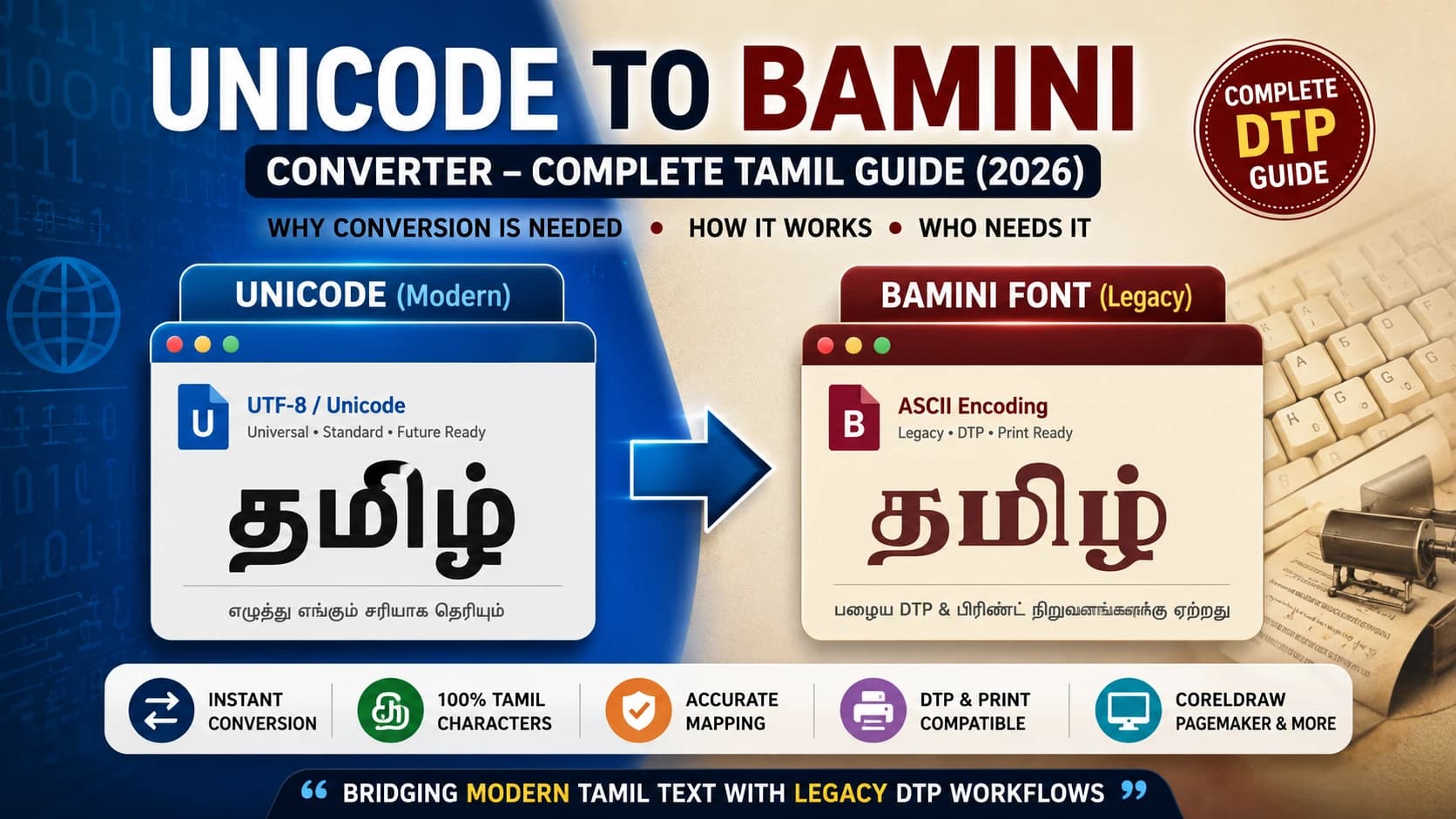
You have Tamil text typed in Unicode. Your CorelDRAW layout, your client's PageMaker template, or the Tamil newspaper press you work with uses Bamini font. You paste the Unicode text, apply Bamini — and the screen fills with what looks like random English letters.
Nothing is broken. Nothing was lost. What you are seeing is the entirely predictable collision between two different eras of Tamil digital typography — and a Unicode to Bamini converter is the tool that fixes it in seconds.
This guide explains everything. What Bamini is, what Unicode is, why they are incompatible by design, how conversion works under the hood, who needs it daily, and whether Bamini is still the right choice in 2026. Whether you are a DTP operator in Chennai, a Tamil newspaper compositor in Colombo, or a designer working with Tamil heritage content anywhere in the world — this is the complete reference.
Table of Contents
- What Is Unicode?
- What Is Bamini Font?
- Unicode vs Bamini — What Is the Difference?
- Why Unicode Text Becomes Random Characters in Bamini
- How Unicode to Bamini Conversion Actually Works
- Who Needs a Unicode to Bamini Converter?
- Step-by-Step: Convert Unicode Tamil to Bamini
- Unicode to Bamini Workflow for DTP Operators
- Common Conversion Problems and Fixes
- How to Check If a File Is Unicode or Bamini
- Bamini Keyboard and Typing Basics
- Best Software That Still Uses Bamini
- Can You Convert Bamini Back to Unicode?
- Should You Still Use Bamini in 2026?
- Unicode vs Bamini for SEO, Websites, and Mobile
- Best Practices for Accurate Tamil Font Conversion
- Conclusion
- Frequently Asked Questions
What Is Unicode?
Unicode is the global standard for text encoding. It was developed by the Unicode Consortium — whose members include Google, Microsoft, Apple, and IBM — to give every character in every writing system on Earth a unique, permanent, universal code point.
For Tamil specifically, Unicode allocates a dedicated block from U+0B80 to U+0BFF — 128 code points covering every Tamil vowel (uyir), consonant (mei), compound letter (uyir-mei), the aytham (ஃ), pulli, and Tamil numerals.
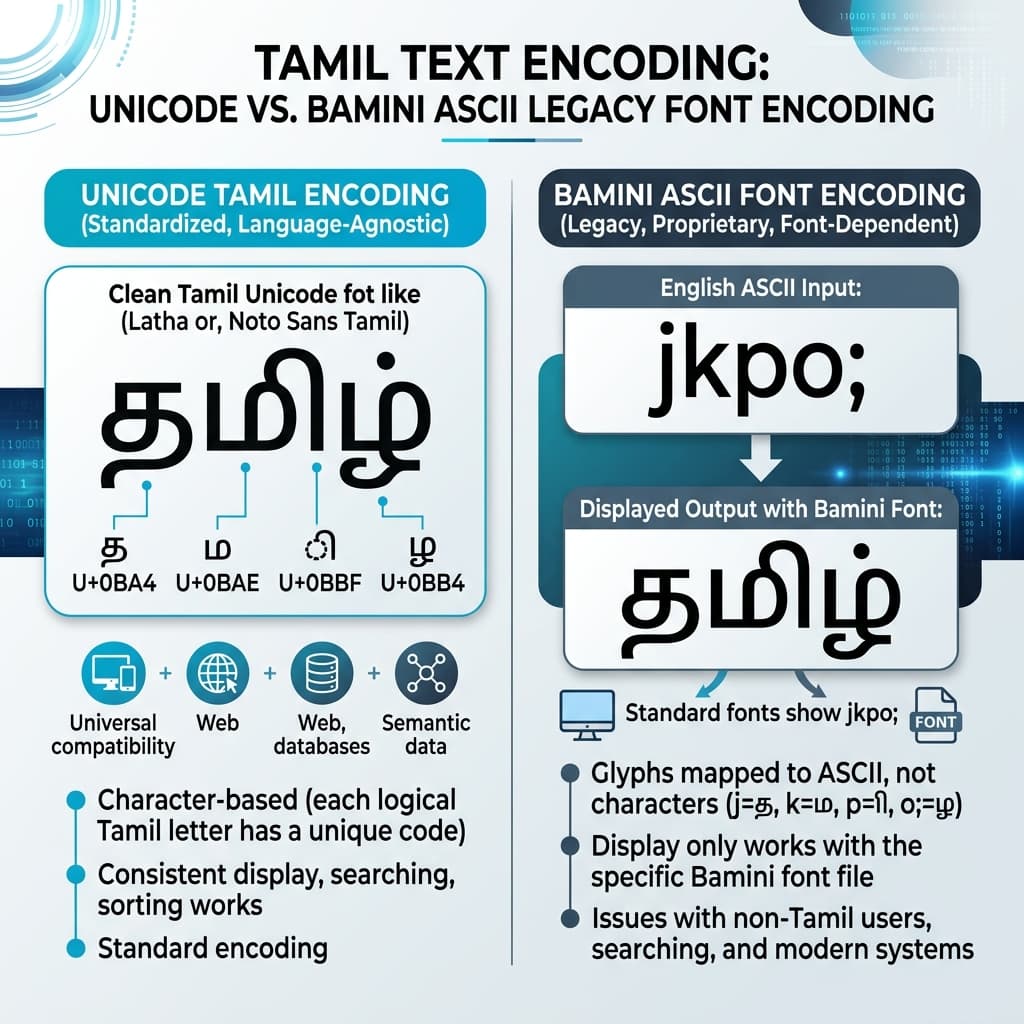
The key property of Unicode that makes it powerful: the character's identity is the code point itself, independent of any font. The Tamil word தமிழ் is stored as the sequence U+0BA4 (த) + U+0BAE (ம) + U+0BBF (ி) + U+0BB4 (ழ்). Those four code points mean "தமிழ்" on every device, every operating system, every browser — whether the user has Tamil fonts installed or not. Modern operating systems include Unicode Tamil rendering support by default.
This universality is exactly what Bamini does not have — and that difference is the root of every conversion need that exists.
What Is Bamini Font?
Bamini is a non-Unicode legacy Tamil font developed in the early 1990s as a practical solution for typing Tamil on computers before Unicode support became widespread. It follows the typewriter-layout tradition — mapping Tamil characters to standard English keyboard keys using the Remington-derived Tamil keyboard layout.
The technical approach is the same used by Kruti Dev for Hindi, Shree Dev for Marathi, and Shree Guj for Gujarati: store Tamil character glyphs at ASCII byte positions in a TrueType font file. Each ASCII position holds a Tamil glyph instead of its normal English character shape. Typing 'm' on your keyboard produces 'அ' in Bamini. Typing 'f' produces a specific Tamil syllable. The computer sees only ASCII — but through the Bamini font, it renders Tamil.
Because Bamini was freely distributed alongside popular Tamil software packages in the 1990s and 2000s and worked on any standard English-keyboard computer without special multilingual software, it became the de facto standard for Tamil desktop publishing across Tamil Nadu, Sri Lanka, Singapore, and the global Tamil diaspora.
The Bamini font family is extensive — running from Bamini Tamil 01 to Bamini Tamil 87, covering regular, bold, italic, and decorative styles. The font file itself is remarkably lightweight at approximately 75–85 KB — meaning it downloads in under a second even on a slow connection, which contributed significantly to its widespread adoption. Its internal character mapping table contains approximately 270 entries covering the complete Tamil character set including all uyir-mei ligatures, pulli combinations, and the aytham.
Unicode vs Bamini — What Is the Difference?
Understanding this comparison clearly is the foundation of everything else in this guide.
| Feature / Property | Unicode Tamil | Bamini Font |
|---|---|---|
| Encoding Standard | International standard, assigned by Unicode Consortium | Private ASCII mapping, no international standard |
| Character Identity | Each character has a permanent, universal code point | Each Tamil glyph sits at an ASCII byte position — meaningless without the font |
| Works Without Font Installed | Yes — any modern device renders Tamil natively | No — appears as random English characters without the font |
| Web and Mobile Compatible | Fully compatible — works on every website, app, and device | Not compatible — only works in software with the font installed |
| Google Indexable | Yes — Google reads and indexes Tamil Unicode text correctly | No — Google sees ASCII characters, not Tamil. Bamini text is invisible to search engines |
| Copy-Paste Safe | Text remains correct Tamil anywhere you paste it | Text appears as garbled characters anywhere without the font |
| DTP Software Compatibility | Works in modern InDesign, newer CorelDRAW, MS Word, Google Docs | Works in CorelDRAW (older versions), PageMaker, Photoshop with the font installed |
| Font Variety | Growing library of Unicode Tamil fonts — Latha, Vijaya, Noto Sans Tamil and more | 87 variants (Bamini 01–87) — extensive decorative and calligraphic range |
| Best Used For | Websites, mobile apps, databases, government portals, modern publishing | Legacy DTP templates, print design in CorelDRAW/PageMaker, Tamil Nadu/Sri Lanka press workflows |
Why Unicode Text Becomes Random Characters in Bamini
This is the question everyone asks the first time it happens — and it has a precise technical answer.
When you type or paste Unicode Tamil text and apply the Bamini font, here is what happens step by step:
Your text contains Unicode code points. The letter த is stored as U+0BA4 — byte value 0xE4 in UTF-8 encoding (3 bytes: E0 AE A4, to be precise). The letter ம is U+0BAE — and so on for each character in your text.
The Bamini font's glyph table is indexed by ASCII byte positions — 0x00 through 0xFF. When the rendering engine looks up U+0BA4 in Bamini's glyph table, it either finds nothing (if the font has no glyph at that position), or finds a completely unrelated glyph that happens to live at whatever ASCII position the Unicode code point maps to in basic encoding.
The result: your Tamil text renders as random Latin characters, boxes, or completely wrong glyphs — because every Unicode Tamil code point is landing at the wrong position in Bamini's glyph table.
The converter fixes this precisely. It reads U+0BA4 (த), looks up the corresponding ASCII byte in the Bamini mapping table (let's say it maps to ASCII position 0x74, which is 't'), and outputs 't'. For every Unicode code point in your input, the converter outputs the specific ASCII byte that Bamini uses for that Tamil character. The output text is ASCII — it looks like random English when you view it in Notepad — but when Bamini is applied, every byte maps to the correct Tamil glyph.
How Unicode to Bamini Conversion Actually Works
The conversion engine at the core of any Unicode to Bamini tool is a lookup table — approximately 270 entries that map Unicode Tamil code points to their corresponding Bamini ASCII byte values. This table was originally documented by the Tamil computing community and is now available as open-source reference — the Pakeetharan converter's mapping table is the most widely cited open-source implementation.
The conversion handles several Tamil-specific complexities:
- Simple vowels and consonants — direct one-to-one code point to ASCII byte mapping.
- Uyir-mei (compound letters) — Tamil compound letters are formed by combining a vowel (uyir) with a consonant (mei). In Unicode, these are stored as separate code points in a logical sequence. In Bamini, they may be stored as single pre-composed glyphs at specific ASCII positions. The converter must recognize the Unicode sequence and output the correct single Bamini byte.
- Pulli combinations — the pulli (dot above a consonant indicating no following vowel) combines with consonants in Tamil. The converter handles these combinations correctly without requiring any manual intervention.
- Kuril and nedil (short and long vowel forms) — Tamil distinguishes between short and long vowel forms, and their encoding differs between Unicode and Bamini. The conversion table accounts for each form separately.
The conversion runs entirely in the browser — no server processing, no data upload. Your Tamil text stays on your device throughout the entire conversion process.
Who Needs a Unicode to Bamini Converter?
Tamil Newspaper DTP Operators
The highest-volume users. Major Tamil newspapers like Dinamalar, Dinamani, and Daily Thanthi built their composing room workflows around Bamini-based templates in PageMaker and CorelDRAW. Journalists and reporters today type in Unicode on their phones and laptops. The DTP operator converts that Unicode content to Bamini before placing it in the layout template. This happens multiple times per publishing cycle, every single day.
Book and Magazine Publishers
Tamil publishers whose typesetting templates use Bamini receive author manuscripts typed in Unicode — because that is how every modern Tamil keyboard works on Android and iPhone. The manuscript requires conversion before it enters the legacy Bamini-based typesetting workflow.
Government Typing Clerks and Court Typists
Government departments in Tamil Nadu and courts that maintain legacy document templates in Bamini encoding need conversion for content received in Unicode. Tamil Nadu's government offices have decades of institutional documents in Bamini format.
Political Campaign Material Designers
During election seasons, political parties across Tamil Nadu produce enormous volumes of banners, posters, pamphlets, and hoardings. Many of these use Bamini-based design templates in CorelDRAW and Photoshop because that is what their established design teams and printing vendors work with.
Typing Institute Students and Instructors
Tamil typing institutes still teach Bamini keyboard layout for legacy DTP career preparation. Students who type fluently in Unicode Tamil need to produce Bamini-encoded output for practice exercises and assessments.
Tamil Diaspora Content Creators
Members of the Tamil diaspora in Singapore, Malaysia, the UK, Canada, and Australia who create content for community publications, temple newsletters, and cultural event materials often encounter legacy Bamini-based templates that require conversion from modern Unicode content.
Step-by-Step: Convert Unicode Tamil to Bamini
Step 1 — Type or collect your Unicode Tamil text
Use any modern Tamil input method — Google Input Tamil, Apple Tamil keyboard, phonetic Tamil on Android, or any Unicode Tamil typing tool. All modern Tamil text from websites, WhatsApp, and digital documents is Unicode by default. Copy the text you need to convert.
Step 2 — Open the Unicode to Bamini Converter
Our Unicode to Bamini Converter is available at unicodetoshreelipi.com/unicode-to-bamini-converter. Paste your Unicode Tamil text into the input box.
Step 3 — Click Convert
The engine processes your text instantly — applying the complete ~270-entry Bamini mapping table to translate every Unicode code point to its corresponding Bamini ASCII byte. Matras, pulli combinations, uyir-mei compounds, and special characters are all handled automatically.
Step 4 — Review the output
The output box will display what appears to be random English characters and symbols. For example, jkpo; xU nrk;nkhop — this is correct. It is properly encoded Bamini text. It will only look like Tamil when the Bamini font is applied in your design software.
Step 5 — Test a short sample first
Before using the full converted output in production, paste two or three test lines into CorelDRAW or PageMaker and apply the Bamini font. Verify that the Tamil renders correctly — check specifically the pulli (dot on consonants), compound vowel-consonant forms (uyir-mei), and the aytham (ஃ) if it appears in your text. These are the three character types most prone to conversion inconsistency.
Step 6 — Copy the full output and use in design software
Once verified, copy the complete converted output. Paste it into your CorelDRAW, PageMaker, or Photoshop layout. Apply the correct Bamini font variant — Bamini Tamil 01 for standard, or whichever variant your template specifies. Your Tamil text renders correctly as Tamil script.
Step 7 — Export as PDF with font embedded
For print output, export from CorelDRAW or PageMaker as PDF with fonts embedded. File > Export > PDF > Embed Fonts. This ensures the press can print correct Tamil without needing Bamini installed separately.
Example Conversion — Before and After
Before (Unicode Tamil input):
தமிழ் ஒரு செம்மொழி
After (Bamini ASCII output):
jkpo; xU nrk;nkhop
How to use: Copy the output. Paste into CorelDRAW. Apply Bamini font. The random characters render as: தமிழ் ஒரு செம்மொழி — exactly the original Tamil, in Bamini calligraphy style.
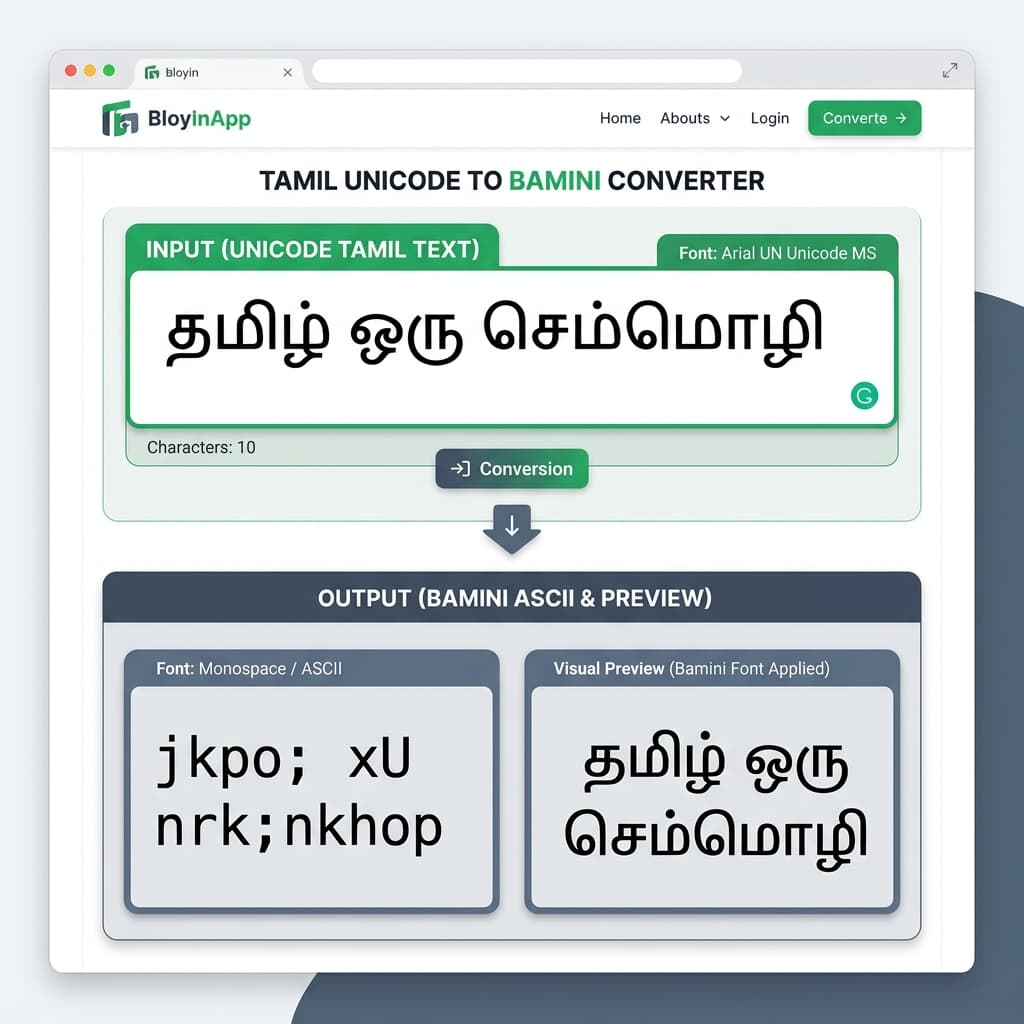
The transformation is visually dramatic. Random Latin characters become proper Tamil the moment the font is applied. This is the core mechanism of every legacy Tamil font workflow.
Unicode to Bamini Workflow for DTP Operators
Professional DTP operators who work with Bamini daily need a workflow that is fast, reliable, and catches errors before they reach the press. Here is the complete professional workflow:
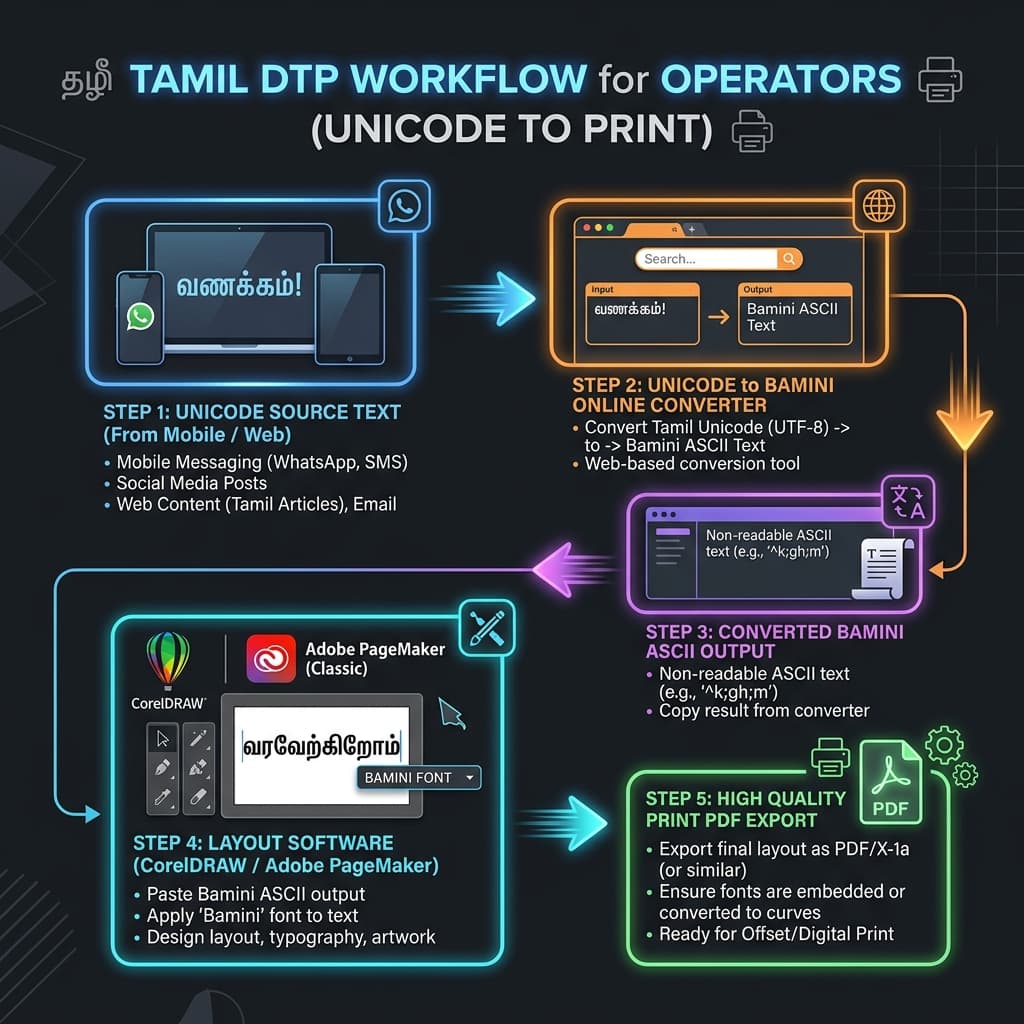
- Receive content in Unicode. Ask all content sources — journalists, editors, clients — to send text in Unicode Tamil. This is standard on every modern device and requires no special instruction for most people. Unicode is what their phone keyboard already produces.
- Keep a Unicode master. Store the original Unicode text separately before converting. If edits are needed after conversion, edit the Unicode master and re-convert — never try to edit Bamini ASCII output directly. Reading and editing ASCII characters that represent Tamil is slow and error-prone.
- Convert in sections for long documents. For articles over 500 words, convert in sections of 300 to 500 words at a time. This makes it easier to locate and fix any specific characters that show inconsistency in the output.
- Test every conversion with a 3-line sample paste. This is not optional. A 30-second test paste in CorelDRAW before processing the full layout prevents press-day emergencies.
- Use a consistent Bamini variant across the layout. If your template specifies Bamini Tamil 01, apply that same variant to all converted text in that document. Mixing Bamini variants within a single layout produces inconsistent rendering.
- Export as PDF for final delivery. Never send native .cdr or .pmd files to a press. Always export as PDF with font embedding enabled.
Common Conversion Problems and Fixes
Problem: Pulli (dot above consonant) is appearing too high or too small.
Cause: Rendering issue in older CorelDRAW versions with specific Bamini font variants.
Fix: Try applying a different Bamini font variant (such as Bamini Tamil 07 instead of Bamini Tamil 01) to see if the pulli rendering improves. The pulli is size-critical in Tamil — ண and ண் are different words — so this must be correct before going to press.
Problem: Uyir-mei compound letters are breaking into two separate characters.
Cause: The converter is outputting a Unicode virama sequence instead of the pre-composed Bamini compound glyph for that combination.
Fix: Verify that the converter is specifically calibrated for Bamini encoding (not for a different Tamil legacy font like TSCII or Tab). A Bamini-specific converter with the correct ~270-entry mapping table handles uyir-mei compounds as single pre-composed bytes.
Problem: The converted text looks correct in CorelDRAW but specific words print wrong.
Cause: Printer driver is substituting a different font at the print stage.
Fix: Export as PDF with font embedding enabled before printing. Do not print directly from CorelDRAW with legacy Bamini fonts — always go through embedded PDF.
Problem: The aytham (ஃ) appears as a wrong character or is missing.
Cause: The aytham is an uncommon character and some conversion tables omit it or place it incorrectly.
Fix: After conversion, search for "ஃ" in your Unicode source and locate the corresponding character in the Bamini output. Manually verify it renders correctly in a test paste.
Problem: Numbers appearing as Tamil numerals when you want English digits, or vice versa.
Cause: Bamini encoding includes Tamil numeral glyphs (௧ ௨ ௩...) at specific ASCII positions. If the source Unicode text contains Tamil numerals, the converter outputs them in Bamini Tamil numeral encoding.
Fix: Replace Tamil numerals with ASCII digits (or vice versa) in the Unicode source before converting, based on what your layout requires.
How to Check If a File Is Unicode or Bamini
This is a practical daily question for DTP operators receiving files from multiple sources. Here is how to tell:
Method 1 — Open in Notepad without applying Bamini
Open the text content in Windows Notepad. If you see readable Tamil characters, it is Unicode. If you see random English letters, symbols, and numbers, it is Bamini ASCII encoding.
Method 2 — Check the font name in the source file
Open the original file in CorelDRAW or PageMaker. Click on the Tamil text block. Check the font name in the properties panel. If it says "Bamini" or "Bamini Tamil 01" (or any numbered variant), the text is Bamini encoded. If it says "Latha," "Vijaya," "Noto Sans Tamil," or any other Unicode Tamil font name, the text is Unicode.
Method 3 — Copy and paste into a browser address bar
Select a Tamil text block. Copy it. Paste it into your browser's address bar. If it shows readable Tamil characters, it is Unicode. If it shows garbage characters or URL-encoded sequences like %E0%AE%A4, the underlying encoding is non-Unicode.
Method 4 — Character count check
A single Tamil vowel-consonant compound (uyir-mei) in Unicode typically uses 2–3 code points. The same character in Bamini typically uses 1–3 ASCII bytes. If your text editor shows a character count significantly higher than the visual Tamil character count, it is likely Unicode with multi-byte sequences.
Bamini Keyboard and Typing Basics
Bamini uses the Remington-derived Tamil keyboard layout — the same typewriter-era arrangement that has been the foundation of Tamil typing since the mid-twentieth century. Key positions mirror the Remington typewriter layout that Tamil secretaries and typists used for decades before computers arrived.
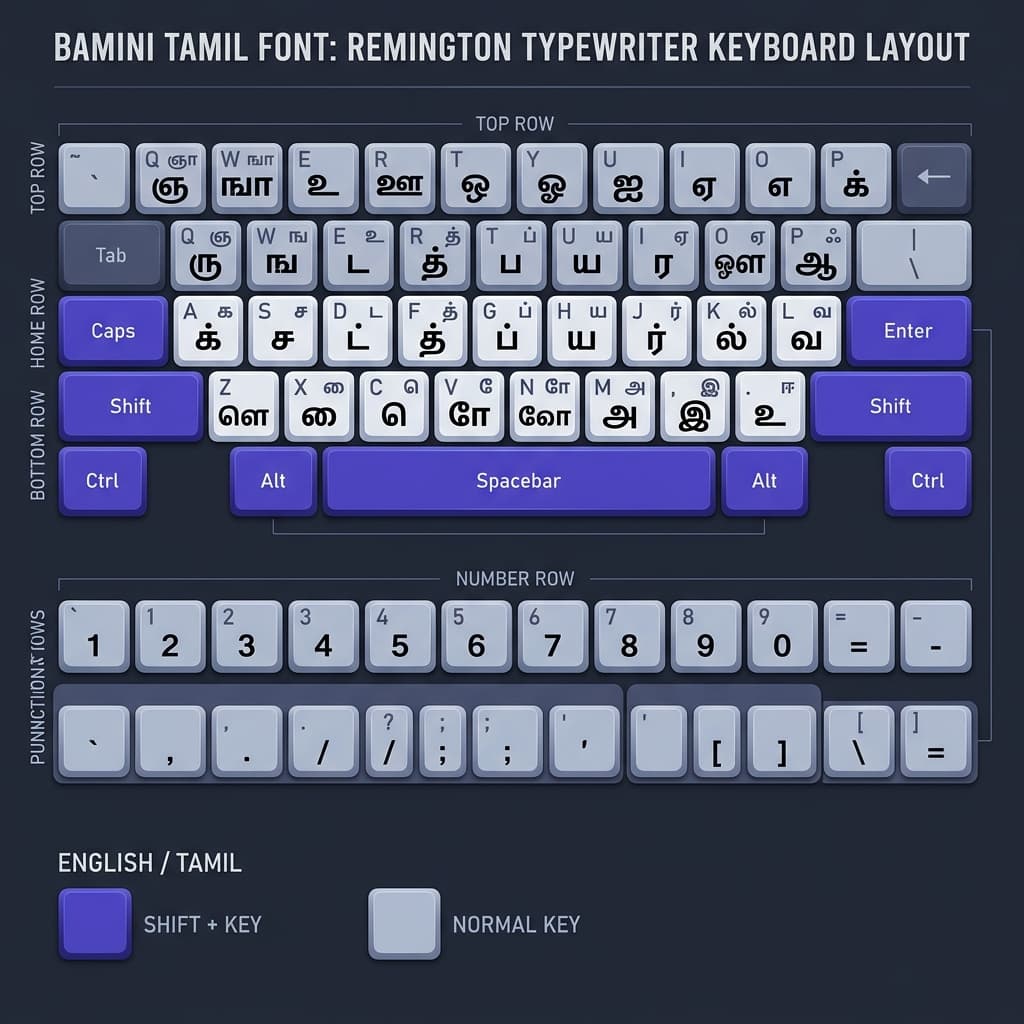
Key characteristics of Bamini keyboard:
'm'types'அ'(A — the first Tamil vowel)';'types'ஆ'(Aa — the long form)','types'இ'(I)'/'types'ஈ'(Ii — long form)'e'types'உ'(U)
Consonant base letters occupy most of the middle keyboard zone, with their pulli (consonant-only) forms accessible via Shift combinations. Uyir-mei compound letters (vowel-consonant combinations) are formed by typing specific key sequences — some as single keystrokes for common compounds, others as two-stroke sequences.
Anyone who learns Bamini typing from scratch needs 4 to 6 weeks of daily practice to reach comfortable speed. Anyone who trained on a Tamil typewriter will find the layout immediately familiar.
Modern alternative: Google Input Tamil, Microsoft Tamil keyboard (InScript), and phonetic Tamil keyboards produce Unicode Tamil directly — no layout memorization needed. For anyone who is not specifically required to work in Bamini, Unicode Tamil input is significantly easier to learn.
Best Software That Still Uses Bamini
CorelDRAW (versions X4 through 2021)
The most common professional environment for Bamini-based design work. Older CorelDRAW versions handle legacy ASCII fonts reliably. Paste converted Bamini text and apply the font — rendering is consistent for print output. Check out our CorelDRAW DTP guide for detailed layout practices.
Adobe PageMaker 6.5 and 7.0
Hundreds of Tamil newspaper composing rooms and printing presses across Tamil Nadu and Sri Lanka continue to run daily workflows on PageMaker 7.0. The software was designed in the pre-Unicode era and works natively with Bamini encoding. Read our guide on PageMaker text conversion for more legacy DTP workflows.
Adobe Photoshop (CS and earlier versions preferred)
Tamil print designers use Photoshop for advertisement design, film posters, signage, and packaging — all of which may use Bamini for text layers. Converted Bamini text pastes directly into Photoshop text layers with the font applied.
Adobe Illustrator (with legacy font settings)
Some print studios use Illustrator with Bamini for Tamil text in vector graphics. The workflow is identical to CorelDRAW — paste converted text, apply font.
MS Word (with Bamini installed)
While MS Word does support Unicode Tamil natively, some users continue to work in Bamini in MS Word for compatibility with older document templates. Bamini text in Word documents requires the font installed on every computer that opens the file.
Can You Convert Bamini Back to Unicode?
Yes — and this is increasingly important as Tamil publishing organizations digitize legacy archives.
The reverse conversion — Bamini to Unicode — works on the same mapping table in reverse. The converter reads each ASCII byte in the Bamini text, looks up which Tamil Unicode code point that byte corresponds to, and outputs the Unicode character. The result is genuine Unicode Tamil — portable, searchable, and readable on every modern device.
Bamini to Unicode conversion is used for:
- Newspaper archive digitization — decades of Tamil newspaper content archived in Bamini needs Unicode conversion to become searchable and accessible online.
- Book and document digitization — publishers digitizing their backlist convert Bamini typesetting files to Unicode for ePub and PDF-with-searchable-text production.
- Government record modernization — Tamil Nadu government departments converting legacy Bamini documents to Unicode for integration into modern document management systems.
- Website content migration — older Tamil websites built in Bamini encoding (which appears as garbled characters to most modern browsers) need content converted to Unicode to be readable online.
Our converter will support bidirectional conversion — Bamini to Unicode and Unicode to Bamini — in the same tool. Coming very soon at unicodetoshreelipi.com. Learn more about Unicode to AMS conversion for similar Indian language font workflows.
Should You Still Use Bamini in 2026?
This is the question that matters practically. The answer depends entirely on your specific situation.
You should still use Bamini if:
- Your existing DTP templates and press infrastructure use Bamini and rebuilding them is not practical in the near term. Template rebuilding costs time, money, and operator retraining — if the business case for migration has not been made internally, Bamini continues to be the operational reality.
- You work with legacy Tamil content archives that exist only in Bamini encoding. Maintaining the ability to open, edit, and print these files requires Bamini.
- Your printing vendor or press requires Bamini format for their production workflow. If the press you deliver to is running Bamini-based PageMaker, delivering in any other format creates friction.
You should move to Unicode if:
- You are building any new DTP workflow, website, database, or publishing system from scratch. Unicode is the universal standard and every new tool, platform, and system supports it natively.
- Your content needs to be searchable, indexable by Google, or shareable digitally. Bamini text is completely invisible to search engines and unreadable without the font. If discoverability matters, Unicode is non-negotiable.
- You are creating content for mobile platforms, web, or social media. Bamini does not work on any of these — Unicode is the only option.
- You are archiving content for long-term preservation. Legacy ASCII encoding is a dead format — Bamini will not be developed further or maintained. Unicode is the durable foundation for Tamil content that will exist for decades.
The professional consensus among Tamil DTP operators and publishing professionals is the same as it is in every other Indian language publishing community: Unicode for digital, Bamini for print DTP when existing templates require it. Convert at the print stage. Keep Unicode as the master.
Unicode vs Bamini for SEO, Websites, and Mobile
This section is short because the answer is simple and unambiguous.
Google cannot index Bamini text. Google's search crawler reads text as Unicode. When it encounters Bamini ASCII characters on a webpage, it sees random English letters — "jkpo; xU nrk;nkhop" — not Tamil. Your Tamil content stored in Bamini is completely invisible to search engines.
Bamini does not work on mobile. Smartphones — Android, iPhone — do not have Bamini installed. Tamil text encoded in Bamini appears as random characters on every mobile browser.
Bamini does not work in modern browsers. Web browsers render Unicode text natively. They do not support legacy ASCII font encoding. Tamil content on websites must be in Unicode.
For any digital use case — websites, social media, email newsletters, digital archives, government portals, mobile apps — Unicode Tamil is the only viable choice. There is no workaround for Bamini in digital contexts.
Best Practices for Accurate Tamil Font Conversion
- Always proofread Unicode source text before converting. Errors in the Unicode input produce identical errors in the Bamini output. Proofread the Tamil text while it is still readable — before it becomes ASCII.
- Test with a 3-line sample before processing full documents. This catches mapping errors, pulli rendering issues, and compound letter breakage before they affect an entire layout.
- Keep the Unicode master file. After converting, store the original Unicode text in a separate file. Editing Bamini ASCII output is slow and error-prone. Always edit the Unicode master and re-convert.
- Use the correct Bamini variant for your template. The 87 Bamini variants (Tamil 01 through Tamil 87) have slightly different glyph designs and some have minor character map variations. If your template specifies Bamini Tamil 07, apply that specific variant — do not substitute Bamini Tamil 01.
- Export PDF with font embedding for all print jobs. Never deliver native CorelDRAW or PageMaker files to a press unless you have confirmed they have the identical Bamini variant installed. Embedded-font PDF eliminates this dependency entirely.
- Check three characters specifically after every conversion: The pulli (vowel-killer dot), the aytham (ஃ), and long-vowel uyir-mei forms like கா, கீ, கூ. These are the most common sources of conversion inconsistency.
Conclusion
Bamini is not going away tomorrow. In Tamil Nadu and Sri Lanka, it is woven into the operational fabric of print shops, government offices, typing institutes, and newspaper composing rooms that have been running on it for over three decades. The infrastructure is real. The trained operators are real. The legacy archives are real.
But the direction is equally clear. Unicode Tamil works everywhere Bamini does not — on every phone, every website, every search engine, every government portal, every modern application. For new content, new workflows, and new systems, Unicode is the only rational choice.
A Unicode to Bamini converter exists between these two realities — letting professionals work in modern Unicode Tamil while serving the legacy print infrastructure that continues to require Bamini encoding. Write in Unicode. Convert at the print stage. Keep Unicode as the master.
Our Unicode to Bamini Converter is available at unicodetoshreelipi.com/unicode-to-bamini-converter. It is free, without character limits, and handles the complete Tamil character set including all uyir-mei compounds, pulli combinations, and the bidirectional Bamini to Unicode reverse direction.
Explore our related guides on Unicode vs ASCII — How Indian Fonts Actually Work, the History of Shree Lipi, and our CorelDraw Hindi Typing Guide for the complete picture of legacy font conversion across Indian languages.
Frequently Asked Questions
Ready to convert? Our main tool handles Unicode ↔ Shree Lipi with the same accuracy and speed — instantly in your browser.
Try Unicode ↔ Shree Lipi Converter