How to Increase Hindi Typing Speed – 10 Proven Tips That Actually Work (2026)
Here is a number that might surprise you: the average Hindi typist in India manages just 15 to 20 words per minute. Professionals who practice correctly reach 40 to 60 WPM. World-class Hindi typists exceed 80 to 100 WPM.
That gap is not talent. It is method.
Most people who struggle with Hindi typing speed are not doing something fundamentally wrong — they are just doing a few specific things in a slightly wrong order. They chase speed before building accuracy. They practice on the wrong font for their exam. They type looking at the keyboard and never build the muscle memory that makes fast typing possible.
Table of Contents
- What “Speed” Actually Means in Hindi Typing
- Tip 1 — Practice on the Right Font From Day One
- Tip 2 — Stop Looking at the Keyboard. Today.
- Tip 3 — Build Accuracy to 95% Before You Touch Speed
- Tip 4 — Use the Home Row as Your Foundation
- Tip 5 — Practice 30 to 45 Minutes Daily
- Tip 6 — Practice on Actual Exam-Style Passages
- Tip 7 — Train for the Full Exam Duration
- Tip 8 — Master Conjuncts and Half-Forms Separately
- Tip 9 — Use Speed Tracking to Practice Smart
- Tip 10 — Simulate Exam Conditions in the Final 2 Weeks
- Your Realistic Speed Timeline
- How Hindi Typing Connects to DTP and Design Work
- Conclusion
- Frequently Asked Questions
🔑 Key Takeaways
- Font choice is critical — practice exclusively on the font your exam uses (Mangal Unicode for most exams).
- Touch typing bypasses the visual search loop that caps speed at 25–30 WPM.
- Accuracy before speed — reach 95% accuracy first, then push WPM.
- 30–45 minutes daily beats 3-hour weekend sessions due to how motor memory consolidates during sleep.
- Track your errors — 3 to 5 characters cause 70–80% of mistakes for most typists.
- Realistic timeline — exam-ready speed of 25–30 NWPM in 2–3 months with consistent practice.
A Quick Word on What “Speed” Actually Means in Hindi Typing
Before the tips, one clarification that saves a lot of frustration.
WPM (Words Per Minute) is the standard measurement — one word equals 5 keystrokes including spaces. But government exams use Net WPM, not Gross WPM. Net WPM is calculated only from correctly typed words. Errors are not deducted — but they also do not count. If you type 300 words in 15 minutes but 80 contain errors, your net WPM is 220 ÷ 15 = 14.67. That is a fail even though your fingers typed 300 words.
This distinction is why typing faster is often the wrong goal. Typing more accurately — so that more of your gross speed converts to net speed — is usually the better leverage point.
Keep that in mind as you go through these tips.
Tip 1 — Practice on the Right Font From Day One
This is not a small technical detail. This is the most important decision you will make.
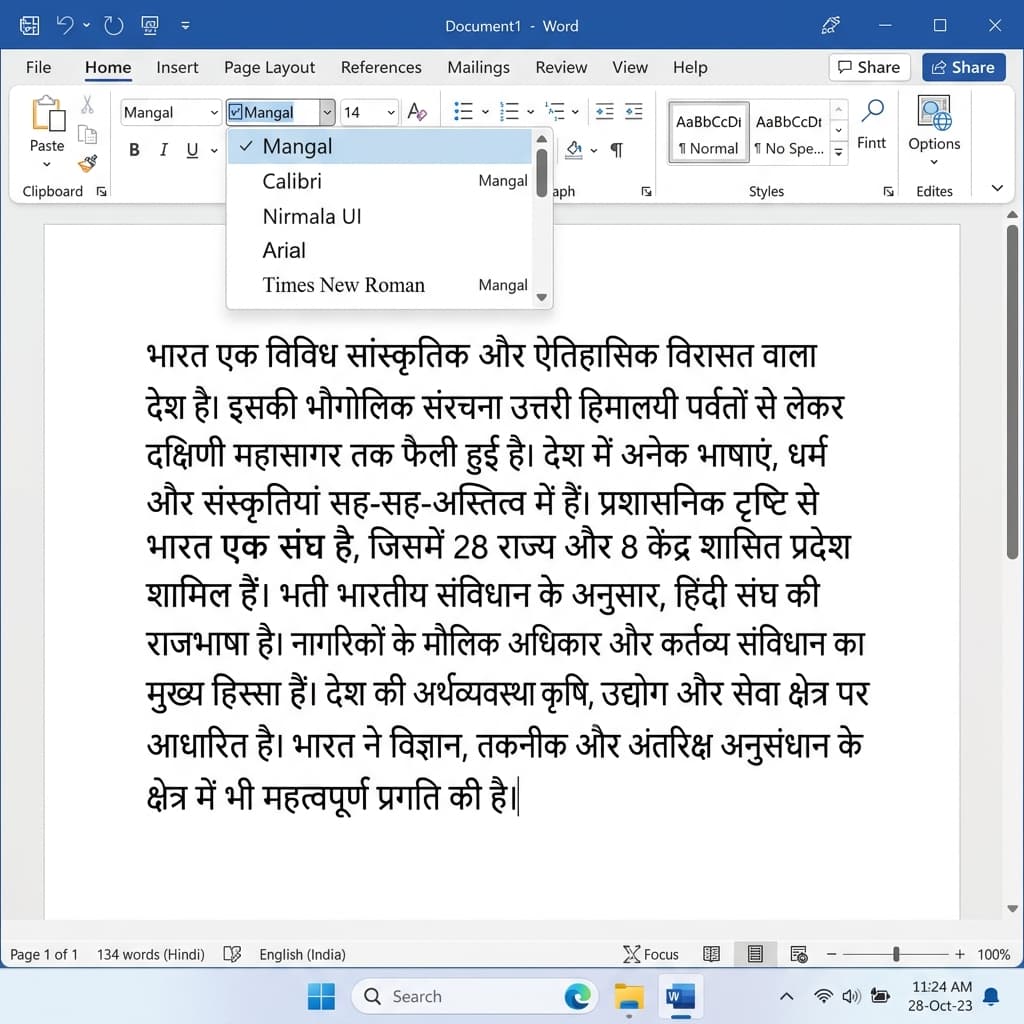
Always practice in Mangal Unicode — not Kruti Dev — if your target exam requires Mangal.
If your target exam uses Mangal Unicode — SSC CHSL, SSC CGL DEO, RRB NTPC, CPCT — practice exclusively on Mangal Unicode. Not Kruti Dev. Not Devlys. Mangal.
If your exam uses Kruti Dev 010 — some older state exams — practice exclusively on Kruti Dev 010.
Here is why this matters so much: the key positions for each character are completely different across fonts. Kruti Dev uses a Remington-derived layout where “d” produces “क”. Mangal InScript places “क” on the “k” key. Six months of Kruti Dev practice builds muscle memory that is actively wrong for a Mangal exam — and vice versa.
Most government exams have moved to Mangal Unicode as the Department of Official Language has progressively standardized Unicode Devanagari for all official digital work. If you are starting from scratch in 2026, Mangal is almost certainly the right choice.
Check your specific exam notification. Confirm the font. Start there and never switch mid-preparation.
Tip 2 — Stop Looking at the Keyboard. Today.
This is the single change that separates typists who plateau at 25 WPM from those who break 40 WPM.
When you look at the keyboard while typing, your brain runs a three-step loop on every keystroke: search for the key, verify the position, press it. This visual search loop consumes 60 to 70% of the time available for each character. No matter how fast your fingers become physically, this visual dependency creates a ceiling you cannot break through.
Touch typing — typing entirely without looking at the keyboard — bypasses this loop. Your fingers move from muscle memory, and your eyes stay on the text. Your brain handles the translation from text to finger movement as a single automatic step instead of a three-step conscious process.
Neuroscience research shows that basic neural pathways for new motor skills form within 14 to 21 days of consistent daily practice. Full muscle memory automation — where 90% of keystrokes happen without conscious thought — takes 8 to 12 weeks. That is the investment required, and it is non-negotiable for reaching 40+ WPM in Hindi.
Tip 3 — Build Accuracy to 95% Before You Touch Speed
Here is the research finding that most typing guides mention but most candidates ignore: candidates who achieve 95% accuracy before pushing for speed consistently reach higher WPM in less total time than candidates who push speed from the beginning.
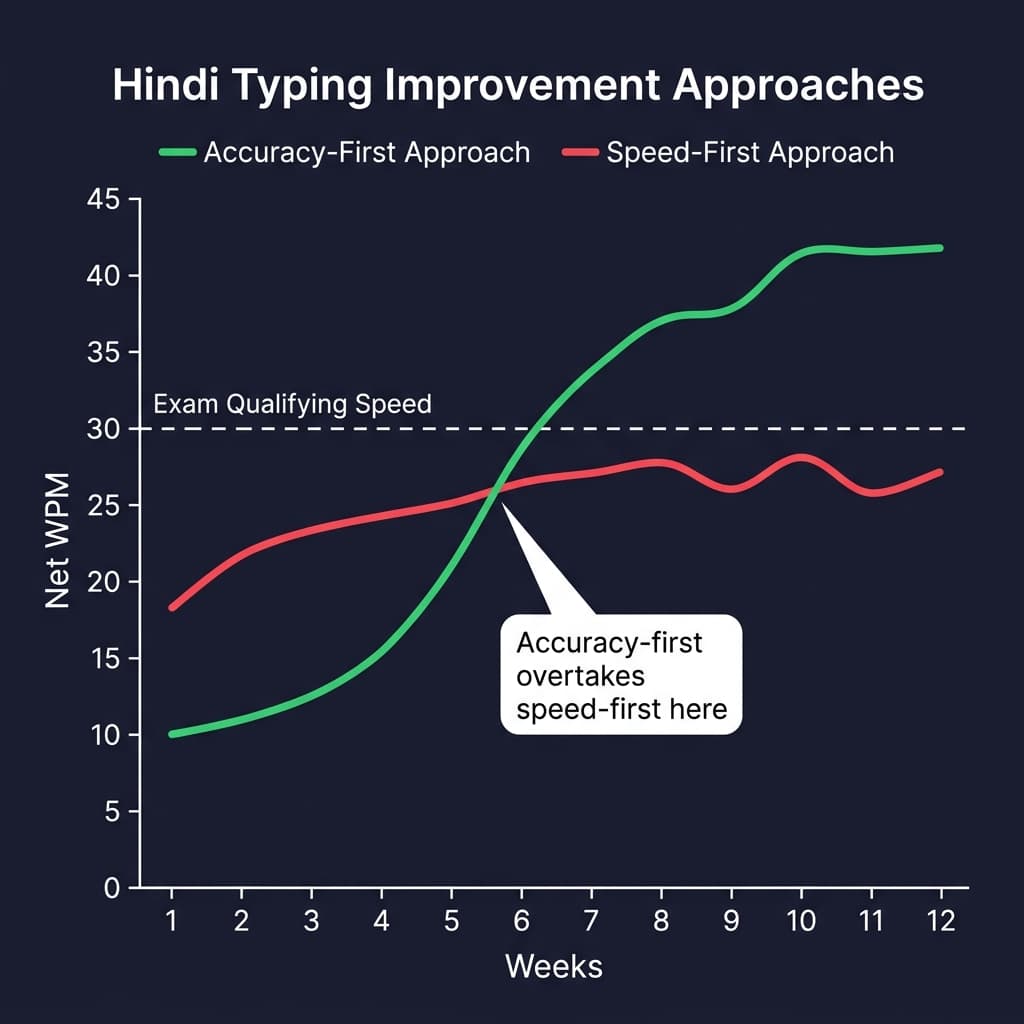
Candidates who prioritize 95% accuracy consistently reach higher WPM faster than those who chase speed first.
The reason is neurological. When you practice fast with errors, your brain learns the error patterns as much as the correct patterns. The motor cortex, which handles procedural memory for typing, does not filter out mistakes — it records whatever you repeat. Fast-but-wrong practice literally trains you to type wrong.
When you practice slowly with high accuracy, the motor cortex records correct patterns only. Speed comes later by repeating correct patterns faster — rather than trying to overwrite incorrect patterns you have already baked in.
Target: 95%+ accuracy at whatever comfortable speed that requires — even if that is only 12 to 15 WPM. Hold that accuracy standard for the first 2 weeks. Then, and only then, push for speed.
One typing coach who has trained thousands of students puts it this way: maintain 98% accuracy and speed follows automatically. Students who follow this principle reach 45 to 50 WPM within 4 to 6 weeks. Students who chase speed first take 3 to 4 months for the same result — and often still have unstable accuracy.
Tip 4 — Use the Home Row as Your Foundation
The home row position is where your fingers rest naturally when not actively pressing a key. Left hand on A-S-D-F. Right hand on J-K-L-semicolon. Thumbs hovering over Spacebar.
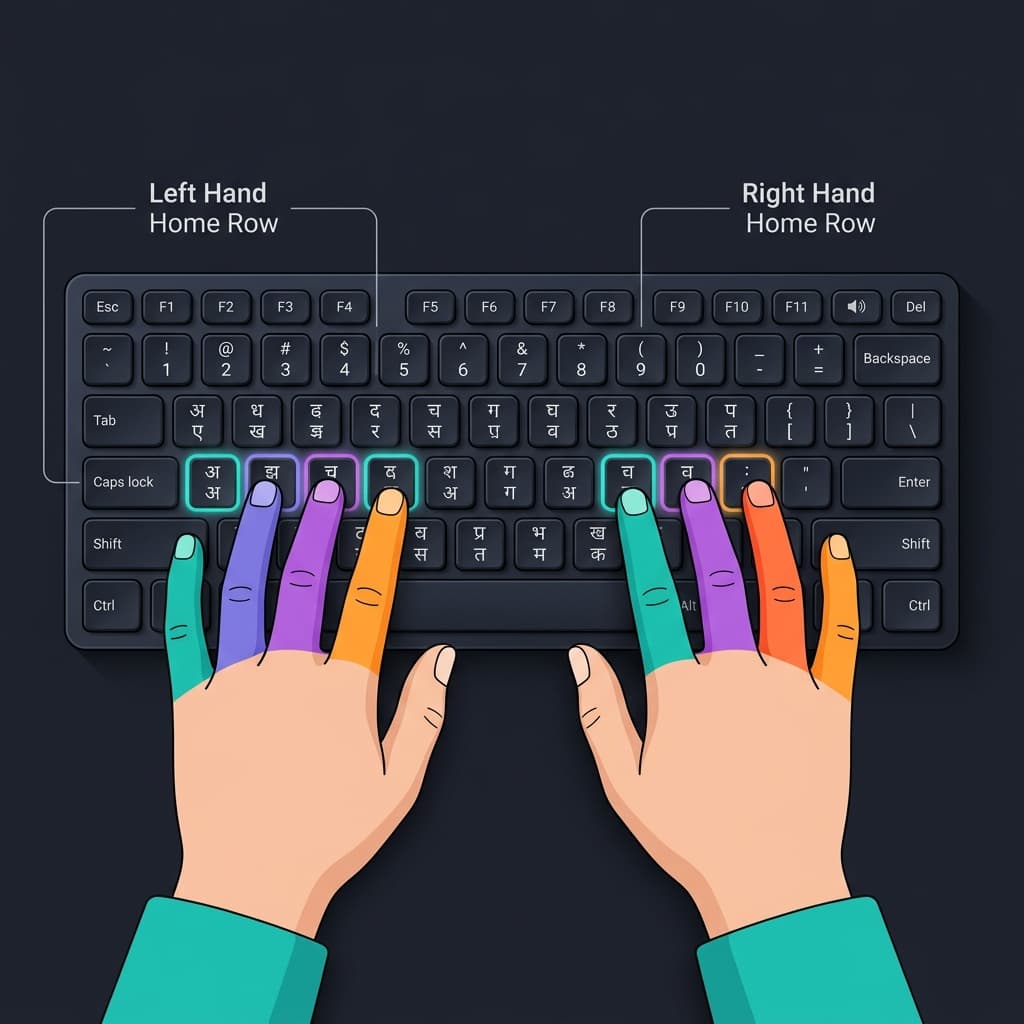
Home row positioning is the single most impactful physical change you can make — it unlocks touch typing and removes your 40 WPM ceiling.
In Hindi InScript, this maps to some of the most frequently used Devanagari characters. In Remington Gail, the home row was specifically designed around the highest-frequency Hindi consonants — क, र, त, न, स — placing them on the strongest finger positions.
Correct home row positioning directly affects your maximum speed ceiling. Research from ergonomics studies of typists suggests that proper posture and hand positioning can account for a 25 to 30% difference in typing comfort and speed in long sessions. A typist with incorrect hand positioning may reach 30 WPM and plateau there indefinitely — the same typist with correct positioning can break 45 WPM with the same practice volume.
Check your hand position right now. Left hand on the home row. Right hand on the home row. Every key reached by moving fingers out from the home row and returning. Never allow your hand to drift permanently away from the home row position.
Tip 5 — Practice 30 to 45 Minutes Daily — Not 3 Hours on Sunday
Consistency is more important than volume. This is not motivational advice — it is how procedural memory works.
The motor cortex consolidates new motor patterns during sleep — specifically during slow-wave and REM sleep cycles. Each practice session creates a consolidation opportunity when you sleep that night. One 30-minute session gives you one consolidation cycle. Seven sessions in a week give you seven consolidation cycles. One 3-hour Sunday session gives you one consolidation cycle — regardless of how exhausted your fingers are by the end of it.
Research consistently shows that 30 to 45 minutes of daily practice over 4 to 6 weeks can move a typist from 25 WPM to 40 WPM or above. The same total practice hours done in 2 to 3 sessions per week produces significantly slower improvement.
📋 Practical Daily Practice Rule
- 30 to 45 minutes daily, six days per week
- One rest day for recovery
- Set a timer — when it goes off, stop
- Overtraining leads to fatigue-based errors that work against accuracy
Tip 6 — Practice on Actual Exam-Style Passages
Generic Hindi text and exam passages are not the same skill.
Government typing exams — SSC CHSL, CPCT, CISF, RRB NTPC — use formal administrative Hindi. Government circulars, departmental notices, official orders, revenue records. This vocabulary has specific patterns: सरकार, विभाग, कार्यालय, अधिकारी, प्रस्ताव, निर्देश, राजस्व, पंचायत, आदेश appear in virtually every passage.
When these words feel automatic under your fingers — when you can type अधिकारी without thinking — your brain frees up cognitive resources for accuracy checking instead of character-by-character decoding. The cognitive load theory behind typing speed improvement says that reducing the mental effort required per word directly increases the accuracy and speed with which other words in the same passage are typed.
From week 2 onwards, practice on actual government-style Hindi passages. Many typing practice platforms include SSC and CPCT-style passages specifically for this purpose.
Tip 7 — Train for the Full Exam Duration — Not Short Bursts
CPCT’s typing test is 15 minutes per language. SSC typing tests are typically 10 minutes. RRB NTPC Hindi typing is 10 minutes.
Most candidates practice in 3 to 5 minute bursts. And most candidates find, on exam day, that their accuracy drops significantly in the final 3 to 5 minutes of a 10 or 15 minute test. Attention wavering. Finger fatigue. Cognitive load accumulating.
The fix is simple: practice at the full exam duration. Not half the time. The full time.
Track your accuracy separately at the 5-minute, 10-minute, and 15-minute marks. If accuracy drops below 90% in the final third of a session, that final third is your specific practice target for the following week. Sustainable accuracy at exam duration is a trainable skill — but only if you train at that duration.
Tip 8 — Master Conjuncts and Half-Forms Separately
Conjuncts — samyuktakshar like क्ष, त्र, ज्ञ, श्र — and the half-forms that appear before them are the most common accuracy-breakers in Hindi typing. They require either a Halant key sequence (in Remington Gail: type first consonant, press Shift+=, type second consonant) or a specific key combination depending on your layout.
Most typists handle common words like नमस्ते and सरकार automatically but slow down or make errors on words containing uncommon conjuncts. This is a precision gap, not a speed gap.
🎯 Conjunct Drill Method
- Create a list of the 20 to 30 most common Hindi conjuncts from government passages
- Drill each one 50 to 100 times until the key sequence feels automatic
- Common conjuncts to master: क्ष, त्र, ज्ञ, श्र, द्ध, क्त, ष्ट, न्त, स्त, प्र
- This targeted practice is far more efficient than general typing volume
Tip 9 — Use Speed Tracking to Practice Smart — Not Just Hard
Tracking your WPM and accuracy after every session is not about motivation. It is about diagnosing exactly what to work on next.
After each practice session, note: your gross WPM, your net WPM (if your practice tool provides it), your accuracy percentage, and which specific characters or words produced the most errors.
Your error distribution will show a pattern within 3 to 4 days of tracking. Most typists have 3 to 5 specific characters or character combinations that account for 70 to 80% of their total errors. These are your actual targets — not generic speed practice.
For example, if your error log shows that the chhoti i matra (ि) and the aa matra (ा) account for 60% of your mistakes, spending 10 minutes per session on those two characters specifically will improve your net WPM faster than any other intervention.
Work smarter than the candidates who just clock practice hours without analyzing where their errors actually come from.
Tip 10 — Simulate Exam Conditions in the Final 2 Weeks
The last two weeks before your exam should include full mock tests under real exam conditions.
Phone off. Timer running. Passage on screen. No pausing, no replaying, no second chances. Fifteen minutes of continuous typing followed by a full result review.
For CPCT specifically, MAP_IT provides an official mock test at cpct.mp.gov.in — this replicates the exact TCS-iON CBT interface, font, keyboard layout, and timing. Practice on this at least three times in the final week so the exam environment feels completely familiar on test day. Exam anxiety from an unfamiliar interface costs candidates 3 to 5 WPM even when their underlying speed is comfortably above the threshold.
For SSC and RRB, several free online platforms offer exam-style timed tests in Mangal Unicode with accurate Net WPM calculation. Use them.
The goal in this phase is not to improve your maximum speed — it is to make your current speed reliable and consistent under pressure.
Your Realistic Speed Timeline — What to Expect
Based on research data and the experience of typing coaches across India, here is what consistent daily practice of 30 to 45 minutes delivers:
| Phase | Timeline | Focus | Expected NWPM |
|---|---|---|---|
| Accuracy Phase | Weeks 1–2 | 95%+ accuracy at comfortable pace. Lock in correct key positions and eliminate bad habits. | 10–15 NWPM |
| Foundation Phase | Weeks 3–6 | Extend accuracy to full exam duration. Consistent accuracy at full test length. | 15–22 NWPM |
| Speed Phase | Weeks 7–10 | Push speed while maintaining 90%+ accuracy. Clear minimum exam threshold comfortably. | 22–30 NWPM |
| Competitive Phase | Weeks 10–16 | Speed and accuracy consolidation. Competitive merit list positioning, not just minimum pass. | 30–40+ NWPM |
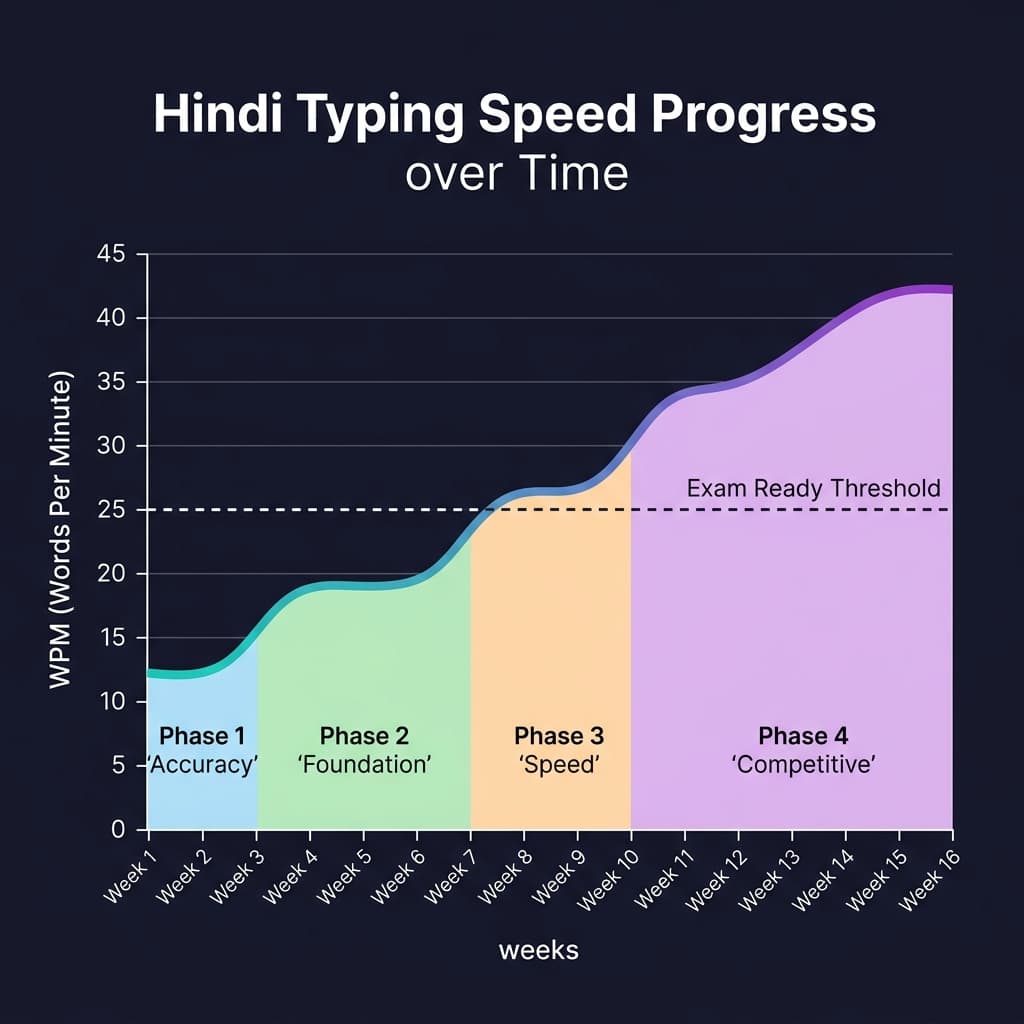
Most candidates reach exam-ready speed (25+ WPM) within 2 to 3 months of consistent daily practice.
Most beginners reach basic proficiency — 15 to 20 NWPM — within 2 to 3 weeks of starting. Exam-ready speed of 25+ NWPM typically takes 2 to 3 months. Breaking 40 NWPM consistently takes 3 to 4 months of the approach described in this guide.
The candidates who reach the top of merit lists are not practicing harder than you — they are practicing smarter, with the right font, the right layout, accuracy before speed, and full-duration mock tests in the final week.
How Your Hindi Typing Connects to DTP and Design Work
If you use Hindi typing professionally beyond exams — for Marathi or Hindi content in CorelDraw, PageMaker, or print design — your Mangal Unicode text is directly usable for conversion workflows.
Any text typed in Mangal Unicode can be converted to Shree Lipi encoding for legacy DTP work using the Unicode to Shree Lipi Converter at unicodetoshreelipi.com. For wedding card or decorative Devanagari design, the Unicode to AMS Converter converts your typed text to AMS calligraphy format instantly.
Your typing skill and your design workflow are part of the same Hindi digital fluency.
Conclusion
Increasing your Hindi typing speed is not complicated — but it does require doing the right things in the right order.
Start with the right font for your exam. Build 95% accuracy before you chase speed. Stop looking at the keyboard. Practice for 30 to 45 minutes daily — not in weekend bursts. Train at full exam duration. Track your errors and fix the specific characters that cause them. Simulate exam conditions in the final two weeks.
Follow these ten tips in sequence and the timeline is clear: exam-ready speed of 25 to 30 NWPM in 2 to 3 months, competitive speed of 35 to 40+ NWPM in 3 to 4 months.
Start your Mangal Unicode setup with the right font download at unicodetoshreelipi.com/fonts. Check our full guide on Mangal font setup and our InScript vs Remington Gail comparison for the complete foundation before your first practice session.
Frequently Asked Questions
Ready to convert? Our main tool handles Unicode ↔ Shree Lipi with the same accuracy and speed — instantly in your browser.
Try Unicode ↔ Shree Lipi Converter