CPCT Typing Test 2026 – Font, Speed, Rules & 30-Day Strategy (Complete Guide)
Let's be direct about something: 60% of candidates who appear for CPCT fail not because of the computer theory section — they fail because of the typing test.
They practiced. They built their speed. They walked into the exam hall confident. And then one small thing caught them off guard — the backspace was disabled, or they had been practicing on Kruti Dev instead of Mangal Unicode, or they had no idea their chosen keyboard layout was locking in the moment they submitted their registration form.
This guide exists so that does not happen to you.
Whether you are targeting MP Patwari, Sahayak Grade 3, Revenue Inspector, Data Entry Operator, or any of the 50+ Madhya Pradesh government posts that require CPCT certification — this is everything you need to know about the 2026 typing test. Font rules, speed requirements, scoring formula, keyboard layout choice, backspace rule, certificate validity, and a practical 30-day strategy.
Table of Contents
- What Is CPCT and Why Does It Matter?
- The Two-Section Structure
- The Font Rule — The One Thing That Trips Most Candidates
- The Keyboard Layout Decision
- The Backspace Rule
- The Scoring System — Minimum vs Competitive
- Posts That Require CPCT
- What the 60% Failure Rate Is Actually Telling You
- The 30-Day Preparation Strategy That Works
- How CPCT Connects to Your Broader DTP Workflow
- Conclusion
What Is CPCT and Why Does It Matter?
CPCT stands for Computer Proficiency Certification Test. It is a mandatory state-level certification exam conducted by MAP_IT — the Madhya Pradesh Agency for Promotion of Information Technology — on behalf of MPPEB (Madhya Pradesh Professional Examination Board).
Think of it as a digital licence for government employment in MP. You cannot apply for most clerical, data entry, or administrative posts in the MP state government without a valid CPCT scorecard. It is not just a typing test — it is the official proof that you meet the computer proficiency standard the state government requires.
Here is what makes CPCT particularly valuable compared to typing tests embedded in individual recruitment cycles: CPCT is a standalone certificate. You clear it once. Your score is permanently recorded in the MAP_IT database. And that certificate is valid for 7 years from the date of the exam — covering potentially dozens of recruitment cycles without you having to test again.
The exam is conducted 4 to 5 times per year across 7 cities in Madhya Pradesh: Bhopal, Indore, Ujjain, Gwalior, Jabalpur, Sagar, and Satna. Confirmed 2026 exam dates include January 16, 17, 18 and May 9, 10, 11 — with additional sessions through the year. Registration opens approximately 2 weeks before each session.
CPCT eligibility is broad: any Indian citizen above 18 years of age who has passed Class 12 (Higher Secondary) or a Polytechnic Diploma after Class 10 can appear. There is no upper age limit and — importantly — no limit on attempts. You can appear as many times as needed until you clear it.
The Two-Section Structure — Understanding Both Parts
CPCT has two mandatory sections. Both must be cleared independently. Passing one and failing the other means your scorecard shows "Not Qualified" — which makes you ineligible for MP government clerical posts until you clear both.
Section A — Computer Proficiency Test (MCQ)
75 multiple-choice questions in 75 minutes. No negative marking. Passing requirement: 50% — meaning 38 out of 75 marks. The syllabus covers computer hardware fundamentals, operating systems, MS Office (Word, Excel, PowerPoint), internet and email basics, number systems (binary, decimal, octal, hexadecimal), reasoning aptitude, and general awareness.
This section is conducted on the TCS-iON CBT platform — the same interface used for many national competitive exams. For most candidates with basic computer knowledge, Section A is manageable with 3 to 4 weeks of focused preparation.
Section B — Typing Test
This is where the exam gets serious. Two typing tests — one in English, one in Hindi — each 15 minutes long. PwBD (Persons with Benchmark Disabilities) candidates receive an additional 5 minutes per section as compensatory time.
The CBT software displays a passage on screen. Your job is to type it accurately within the time limit. The software records every keystroke, calculates your Net Words Per Minute (NWPM), and scores each language test independently.
Both sections are mandatory. Skip one or fail one — no qualification.
- English Typing → 30 NWPM (net words per minute)
- Hindi Typing → 20 NWPM (net words per minute)
These are the minimum thresholds. Passing is not the same as being competitive. More on this in the scoring section below.
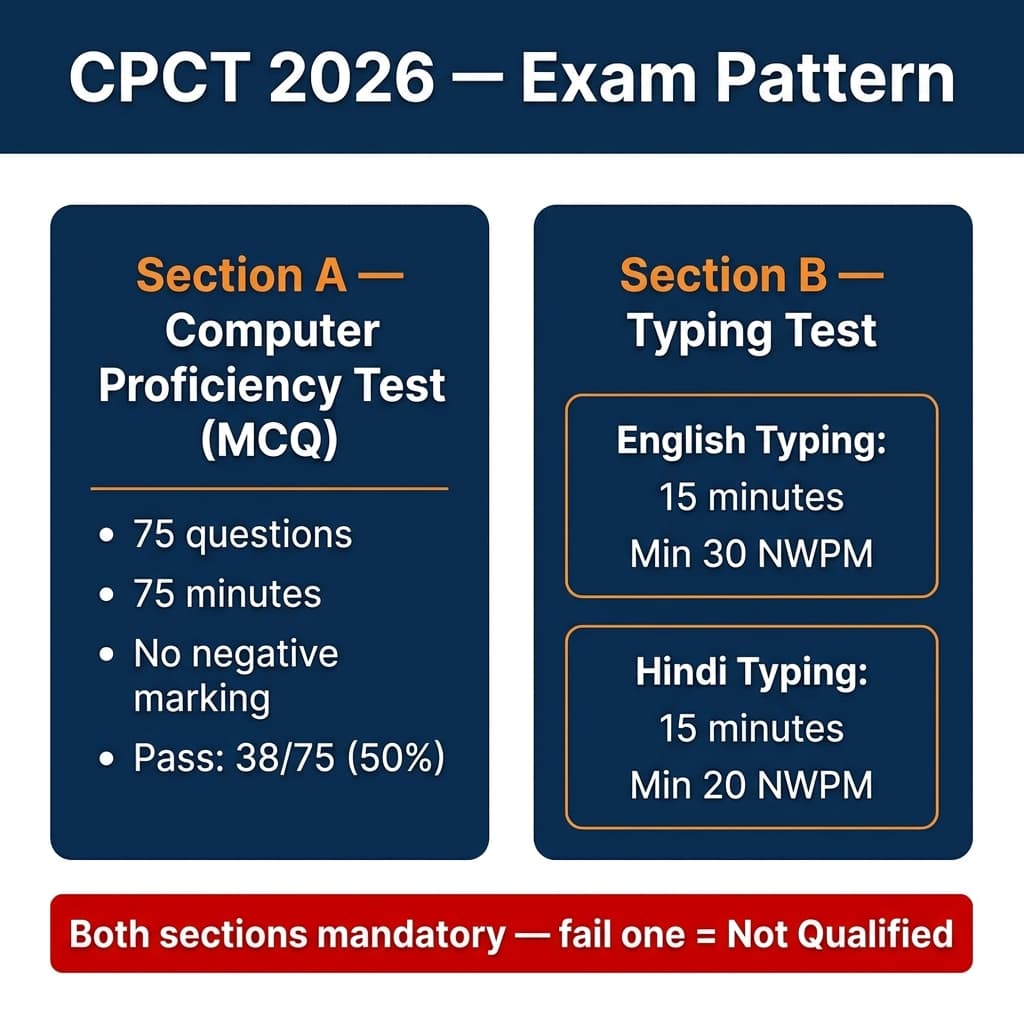
CPCT has two mandatory sections — both must be cleared separately to qualify.
The Font Rule — The One Thing That Trips Most Candidates
Here is the fact that has cost thousands of candidates weeks of wasted preparation:
Kruti Dev and Devlys do not work in CPCT. Full stop.
The CPCT typing test uses Mangal Unicode exclusively for Hindi typing. Mangal is a Unicode-compliant Devanagari font developed as part of Microsoft's Bhasha India initiative. It is the official Hindi typing standard for all central and most state government digital work — endorsed by the Department of Official Language.
Kruti Dev and Devlys are legacy ASCII-based fonts. They use a custom character mapping that has no place in a Unicode test environment. If you have spent months building speed on Kruti Dev, that speed does not transfer to Mangal. The key positions are different, the output encoding is different, and the exam software is built entirely around Unicode.
This is not a technicality — it is the most common reason candidates who were "ready" walk out of the CPCT exam hall having failed.
The rule: Practice on Mangal Unicode. Nothing else for CPCT. (You can download Mangal font free here if you don't have it.)
The Keyboard Layout Decision — Make This Call Before Day One
Here is the second major decision point — and unlike font choice, this one is locked in at registration. Once you select your keyboard layout on the CPCT application form, it cannot be changed.
CPCT 2026 allows two keyboard layout options for Hindi typing:
Option 1 — Remington Gail
The digital successor to the mechanical Hindi typewriter. Remington Gail maps Devanagari characters to keyboard positions based on usage frequency — the most common Hindi characters (क, र, त, न, स) sit on home-row finger positions for maximum typing efficiency. The Halant key (Shift+=) is used to create conjuncts and half-forms like त्र, ज्ञ, and क्ष.
Remington Gail feels familiar to anyone who trained on a traditional Hindi typewriter or learned Kruti Dev typing. The layout was standardised for Unicode input by MAP_IT and is the dominant choice among CPCT candidates in Madhya Pradesh.
How to set up: Install the official CPCT keyboard driver from the MAP_IT portal at cpct.mp.gov.in. This is important — use the official driver, not a generic Remington Gail setup, to ensure your key positions exactly match the exam-day configuration.
Option 2 — InScript
The official government-standardised keyboard layout, codified as IS 16350:2016 by the Bureau of Indian Standards (BIS). InScript arranges Devanagari characters in logical phonetic zones — vowels and matras on the right side, consonants on the left, aspirated consonants on Shift positions above their unaspirated pairs.
InScript is built into every copy of Windows — no additional software download required. It is the layout used in central government exams like SSC CHSL, SSC CGL DEO, and RRB NTPC. If you are preparing for both central and MP state exams simultaneously, InScript has a cross-exam advantage.
How to set up: Windows Settings → Time & Language → Language → Add Hindi (India) → Enable InScript keyboard → Switch with Windows Key + Spacebar.
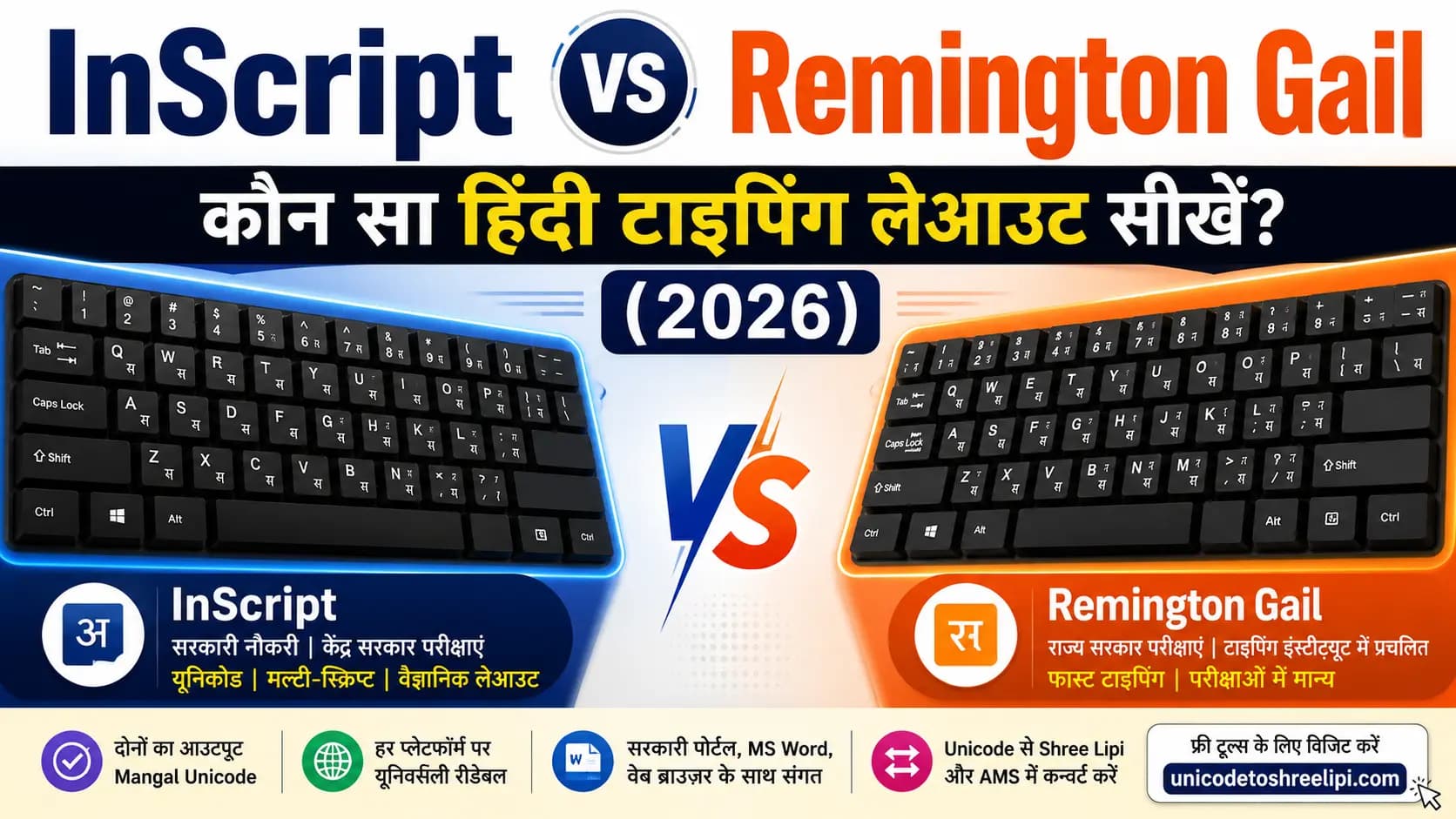
Choose your layout before registering. For an in-depth comparison, check our InScript vs Remington Gail guide.
Which should you choose?
- If you have prior Kruti Dev or typewriter experience: Remington Gail. Your muscle memory transfers faster and you will reach exam speed within 2 to 3 weeks.
- If you are a complete beginner with no prior Hindi typing: Remington Gail is still the recommendation for CPCT specifically, because it is the layout most CPCT coaching institutes teach and the one most practice resources are built around.
- If you are simultaneously targeting SSC or RRB: InScript, because it is the standard for those central exams. For CPCT, InScript is also accepted — you will just need to confirm your choice at application stage.
One critical rule regardless of which you choose: Make your decision before starting preparation. Do not practice Remington Gail for 30 days and then switch to InScript for the exam. You cannot change after registration.
The Backspace Rule — The Fact That Changes Everything
There is conflicting information about this online, so here is the verified position from official CPCT instructions:
Backspace IS allowed in CPCT. The official instructions state: "Backspace key may be used as and when needed."
However — and this is critical — once you press the Spacebar to confirm a completed word, you generally cannot go back to correct that word. The word is committed. Only corrections within the current in-progress word are reversible via backspace.
This means the real risk is not the backspace rule itself — it is the scoring method. CPCT uses Net Words Per Minute (NWPM) based on correct words only. Incorrect words do not count toward your score. They are simply lost time.
There is no deduction for errors — but every incorrectly typed word that you press Spacebar on is permanently gone from your score. If you type 300 words in 15 minutes but 80 of them contain errors, your NWPM is 220 ÷ 15 = 14.67 NWPM. That is a fail.
This is why candidates who practice at 28 WPM gross but with only 70% accuracy frequently fail, while candidates who practice at 22 WPM gross with 95% accuracy consistently pass.
The lesson: CPCT rewards accuracy over raw speed. Every single time.
The CBT software gives you live visual feedback during the test. A correctly typed word typically highlights in green. An incorrectly typed word highlights in red. Pay attention to this feedback — if you see red, do not rush to move forward. Use backspace to correct while the word is still in progress.
The Scoring System — Minimum vs Competitive
Here is something most CPCT guides do not tell you: passing CPCT is not the same as being competitive for MP government jobs.
The minimum thresholds (30 NWPM English, 20 NWPM Hindi) get your certificate. But when MP state departments release merit lists for posts like Patwari, Sahayak Grade 3, or Data Entry Operator, they rank candidates by CPCT score. A candidate with 45 NWPM English and 35 NWPM Hindi gets ranked above a candidate who scraped through at 31 NWPM English and 21 NWPM Hindi.
CPCT awards certificates at three performance grades:
- Basic Level: Minimum passing threshold (30 NWPM English, 20 NWPM Hindi)
- Intermediate: Approximately 35–40 NWPM across both languages
- Advanced: 40+ NWPM sustained across both languages
For competitive selection — especially for high-demand posts like MP Patwari or Sahayak Grade 3 where hundreds of candidates apply per vacancy — an Advanced grade certificate is a serious advantage. Smart candidates do not target the minimum. They target 30–35 NWPM Hindi and 40+ NWPM English, which typically places them in the top 30% of scorers and gives strong merit list positioning.
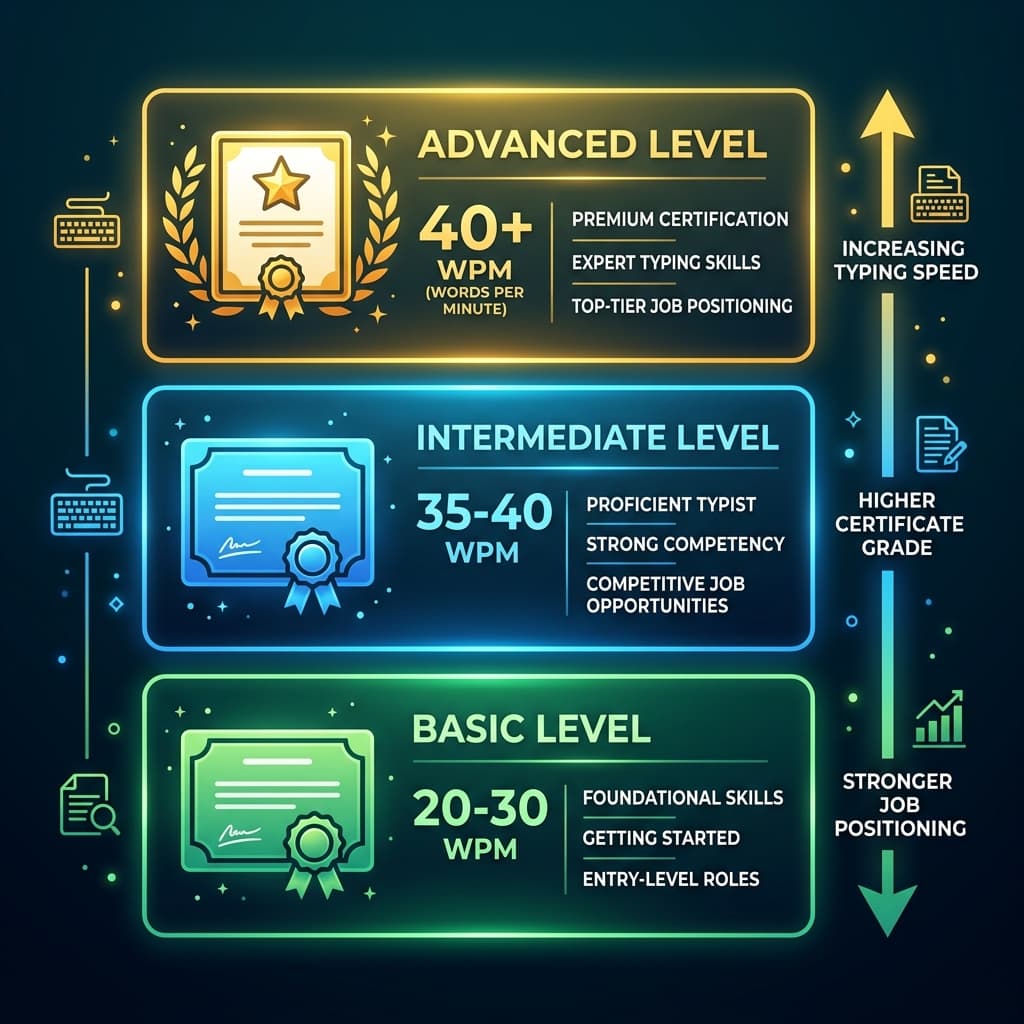
Higher speed = better certificate grade = stronger position in MP government job merit lists.
The CPCT certificate is valid for 7 years from exam date. Once you qualify, your score is permanently recorded in the MAP_IT database and verifiable by any MP government department at any time. You clear it once — and it works for you across every MP government recruitment cycle for seven years.
Posts That Require CPCT — The Full Picture
CPCT is not one exam for one job. A single valid CPCT scorecard unlocks eligibility for over 50 Madhya Pradesh government posts. Here is the landscape:
- MP Patwari: Digital land records management. CPCT is mandatory in most recent Patwari recruitment notifications alongside an ITI COPA diploma or equivalent computer qualification.
- Sahayak Grade 3 (Assistant Grade 3): Clerical roles across MP government departments. CPCT strictly mandatory. This is the highest-volume post category that requires CPCT.
- MP Panchayat Sachiv: Village-level digital administration. CPCT required for recent recruitment cycles.
- Revenue Inspector: CPCT certificate required alongside departmental qualification.
- Data Entry Operator (DEO): Under various MP departments. CPCT is the primary typing eligibility proof.
- MP ESB Group 2 and Group 3: IT Operators, DEOs, and office support posts under the Employees Selection Board.
- MP Police ASI (Computer / Technical) and MP Constable Clerical: Technical and clerical roles within the MP Police force. CPCT required for computer and radio operator posts.
- MP High Court JJA (Junior Judicial Assistant): Typing carries 80 marks in the selection process. Speed and accuracy here directly impact final selection, not just eligibility.
For many posts, the official notification asks for both a CPCT scorecard AND a one-year computer diploma (COPA, DCA, or PGDCA). CPCT alone is not always sufficient — check each specific job notification carefully.
What the 60% Failure Rate Is Actually Telling You
The statistic that 60% of CPCT candidates fail at the typing stage is widely cited — and the reasons are consistent across exam cycles:
- The single biggest cause: Practicing on Kruti Dev instead of Mangal Unicode. Candidates who trained on Kruti Dev arrive at the exam to find that their muscle memory is mapped to a completely different key layout. Their speed effectively drops to near zero on exam day.
- The second cause: Ignoring the scoring mechanics. Candidates who built raw speed without building accuracy consistently fall below 20 NWPM Hindi once incorrect words are removed from their score count.
- The third cause: Underestimating the 15-minute duration. CPCT's typing test is 15 minutes per language — considerably longer than the 8 to 10 minute tests used in SSC and RRB exams. Candidates who trained for shorter bursts find that their accuracy deteriorates significantly in the final 5 minutes of each section due to fatigue and attention loss.
- The fourth cause: Layout confusion. Candidates who selected InScript on their application form practiced Remington Gail — and vice versa. Since the layout is locked at registration, there is no recovery on exam day.
Every one of these failures is avoidable with the right preparation approach from day one.
The 30-Day Preparation Strategy That Works
This is the preparation plan recommended by CPCT coaching institutes across MP — divided into three distinct phases.
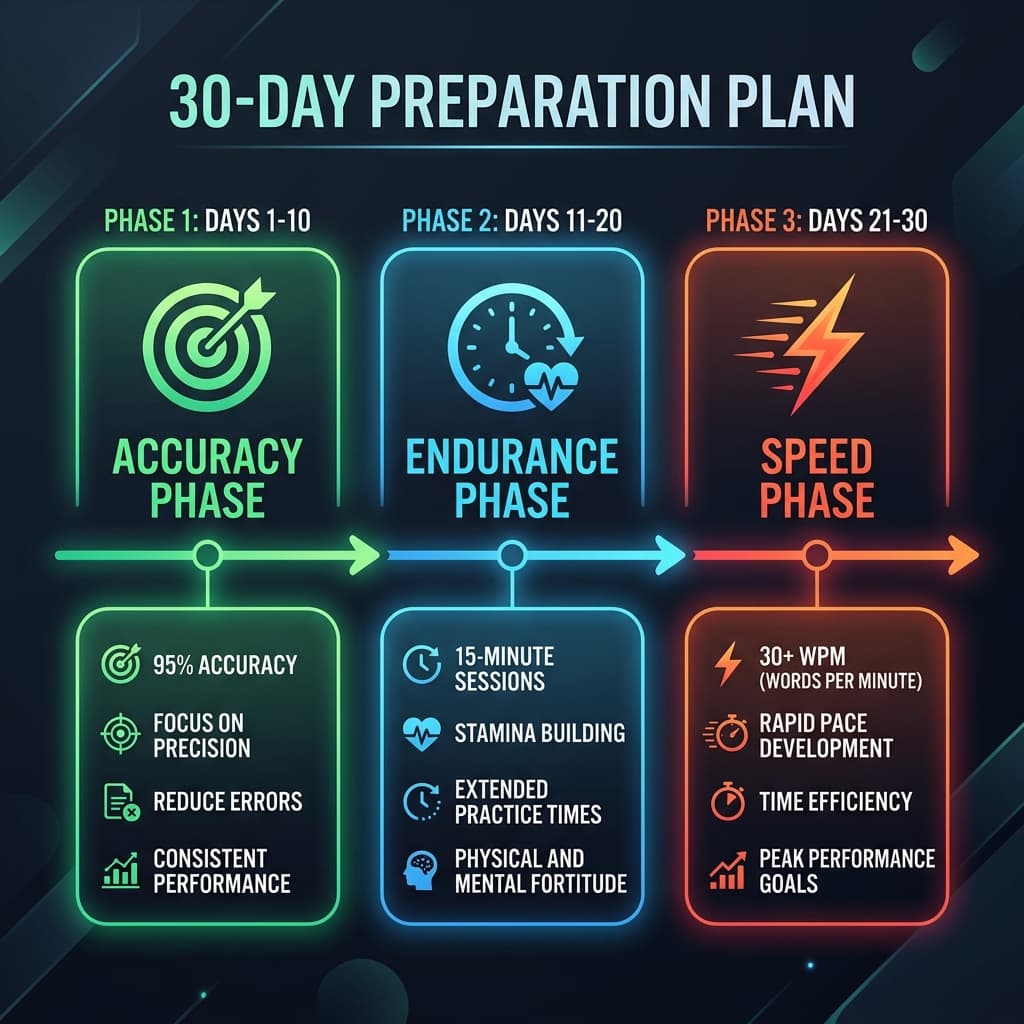
Three phases — accuracy first, endurance second, speed last. This sequence is what separates passers from repeaters.
Days 1 to 10 — The Accuracy Phase
This phase has one goal: reach 95% accuracy. Speed does not matter yet. Deliberately slow down. Type carefully. Do not use backspace to mask errors — instead, aim to not make errors in the first place.
Practice with 5-minute sessions focused on specific character groups: vowels and matras on day 1 and 2, home-row consonants on day 3 and 4, conjuncts using the Halant key on day 5 and 6, and full short passages from day 7 onwards.
Disable the backspace key in your practice tool during this phase. This forces your brain to slow down and lock in the right key positions rather than relying on corrections as a safety net.
Target by end of Day 10: 95%+ accuracy at whatever speed feels natural — even if that is only 12 to 15 NWPM. Accuracy is the foundation. Everything else builds on top of it.
Days 11 to 20 — The Endurance Phase
You now have accuracy. This phase builds it to last the full 15 minutes. The mistake most candidates make is practicing in 5-minute bursts and assuming the skill transfers to 15 minutes. It does not. The final 3 to 5 minutes of a CPCT typing test are where accuracy drops — because attention wavers and finger fatigue sets in.
Increase your practice sessions to full 15-minute blocks. Track your accuracy at the 5-minute, 10-minute, and 15-minute marks separately. If your accuracy drops below 90% in the final 5 minutes, focus your next sessions specifically on sustaining accuracy in that window.
Also in this phase: practice on actual government-style Hindi paragraphs. CPCT passages use formal administrative Hindi — the vocabulary of government circulars, departmental notices, and official communications. This vocabulary has patterns. The words सरकार, विभाग, कार्यालय, अधिकारी, प्रस्ताव, निर्देश appear constantly. The more familiar these words feel under your fingers, the faster they come out without conscious thought.
Target by end of Day 20: 90%+ accuracy across the full 15 minutes. NWPM of 18 to 22 Hindi, 28 to 32 English.
Days 21 to 30 — The Speed Phase
Accuracy is stable. Endurance is built. Now push speed. Take full-length 15-minute tests under real exam conditions — no pausing, no interruptions, phone off, timer running.
Track your NWPM after every session. Most candidates who complete this three-phase plan see their Hindi speed reach 25 to 30 NWPM and English reach 35 to 40 NWPM by day 30 — well above the minimum threshold and into competitive territory.
On days 28 to 30: take mock tests using the official CPCT interface. MAP_IT provides a mock test on the cpct.mp.gov.in portal that replicates the exact exam software — same CBT interface, same font, same layout. Practice on this at least twice before your exam date so the test environment is familiar on exam day.
How CPCT Connects to Your Broader DTP Workflow
If you work in Marathi or Hindi DTP alongside your exam preparation, your Mangal Unicode typing skill is directly transferable to digital publishing workflows.
Any text you type in Mangal Unicode — in InScript or Remington Gail — can be converted to Shree Lipi legacy format for use in PageMaker or CorelDraw using the Unicode to Shree Lipi Converter. The same Unicode text converts to AMS calligraphy encoding for wedding card or decorative design work using the Unicode to AMS Converter.
Your CPCT preparation and your DTP workflow are not separate worlds. The Unicode typing skill you build for the exam is the same skill that powers professional Hindi publishing. For more details on CorelDRAW workflows, you can check our CorelDRAW Hindi Typing Guide.
Conclusion
CPCT is not a hard exam. It has a clear structure, verified rules, and a passing bar that any committed candidate can reach within 30 days of focused preparation.
What makes it hard for the 60% who fail is misinformation — practicing on the wrong font, choosing the wrong keyboard layout, misunderstanding the scoring, or not training for the full 15-minute duration. Every one of those failure causes is in your control.
The path is straightforward: Use Mangal Unicode. Choose your keyboard layout before day one and commit. Build accuracy first — target 95% before you chase speed. Train for the full 15 minutes, not 5-minute bursts. Use the official MAP_IT mock test in the final week.
Your CPCT certificate is valid for 7 years. Fifty-plus government posts in Madhya Pradesh open to you. One 30-day preparation cycle done right.
Start with the right setup. Get your Mangal font downloaded and installed. Check our guide on Mangal font setup and InScript vs Remington Gail comparison on this site for the complete foundation before your first practice session.
Frequently Asked Questions
Ready to convert? Our main tool handles Unicode ↔ Shree Lipi with the same accuracy and speed — instantly in your browser.
Try Unicode ↔ Shree Lipi Converter